
Build a Multi-Wallet Portfolio Tracker on Hyperliquid (Full Guide)
By CMM Team - 28-May-2026
Build a Multi-Wallet Portfolio Tracker on Hyperliquid (Full Guide)
You run three wallets on Hyperliquid. One trades BTC and ETH with tight leverage. Another is a higher-risk altcoin account. The third is a vault position you barely check. You know the PnL of each wallet individually, but you have no idea what your total exposure looks like across all of them, what your combined liquidation risk is, or whether two of your wallets are accidentally doubling up on the same directional bet.
This is the multi-wallet problem, and it affects almost everyone who trades perps seriously. Hyperliquid's native interface shows one wallet at a time. Most analytics tools do the same. So your "portfolio view" is a mental model, pieced together from tabs and memory, which is exactly the kind of system that breaks under stress.
A multi-wallet portfolio tracker solves this by pulling positions, fills, and cohort data from every wallet you care about and rendering them in a single unified view. This guide walks through how to build one using the HyperTracker API: the data architecture, the API calls, the aggregation logic, and the rate limit math that keeps you under budget on a Pulse plan.
The data model: what a portfolio tracker actually needs
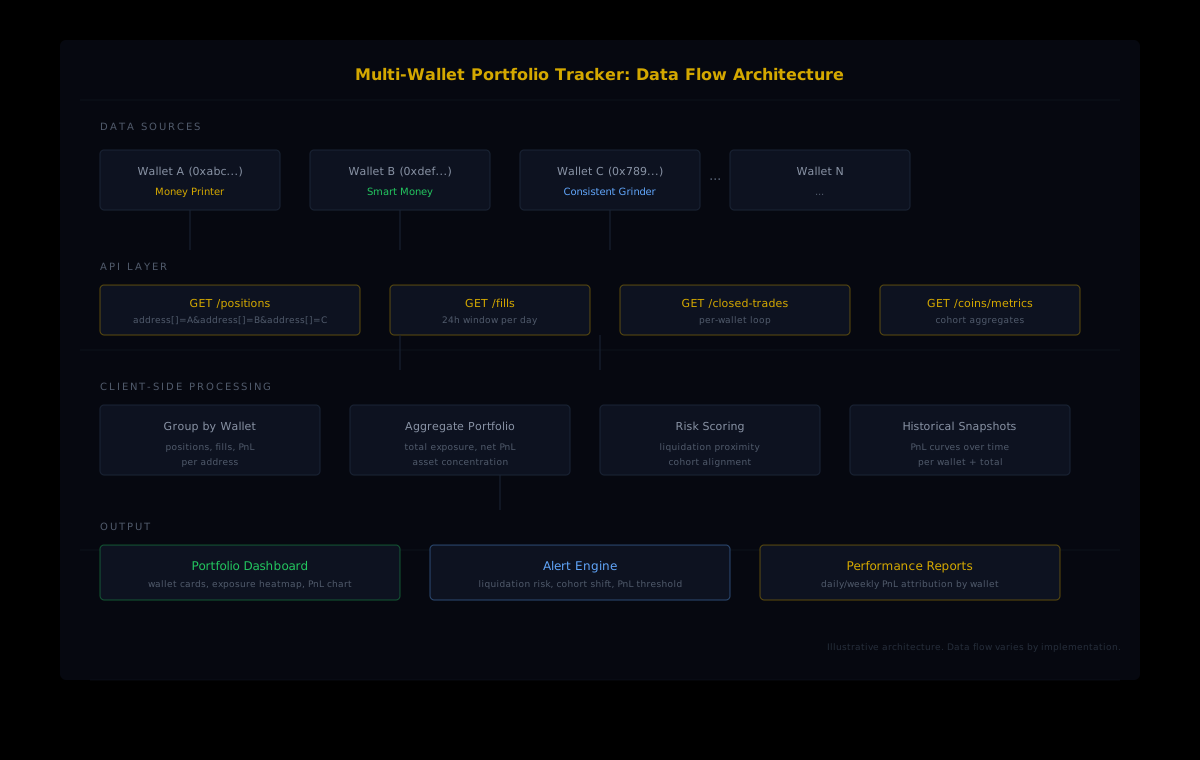
Before writing any code, it helps to define what "portfolio tracking" means in concrete data terms. A useful multi-wallet tracker needs four categories of information, each served by a different API endpoint.
Open positions are the real-time state of every active trade across all wallets. For each position, you need the coin, the side (long or short), the entry price, the current size, the leverage, and the liquidation price. The HyperTracker /positions endpoint returns all of this, and it accepts multiple wallet addresses in a single request using repeatable address parameters.
Recent fills are the trade executions that happened since your last poll. They tell you when a wallet opened, closed, or adjusted a position. The /fills endpoint returns fills with side, price, size, and timestamp. It also accepts multiple addresses per request, but each request is capped to a 24-hour window.
Closed trades give you the complete lifecycle of a finished position: entry, exit, duration, realized PnL, fees, and funding costs. The /closed-trades endpoint handles this, but it only accepts one wallet per request, so you need to loop through your addresses.
Cohort context tells you what the broader market is doing. The /coins/metrics endpoint returns cohort-level positioning data for any asset: what percentage of Money Printers are long, how Smart Money exposure is shifting, whether Leviathans are adding or reducing. This is the signal layer that turns raw portfolio data into intelligence.
Querying multiple wallets in a single call
The /positions and /fills endpoints accept repeatable query parameters, which means you can pass multiple wallet addresses in one HTTP request instead of making separate calls for each wallet. This is the single biggest efficiency gain in the entire architecture.
Here is how a multi-wallet positions query looks in practice:
import requests

API_BASE = "https://ht-api.coinmarketman.com/api/external"
headers = {"Authorization": "Bearer YOUR_TOKEN"}

# Query 5 wallets in a single API call
wallets = [
    "0xabc...1111",
    "0xdef...2222",
    "0x789...3333",
    "0x456...4444",
    "0xfed...5555"
]

response = requests.get(
    f"{API_BASE}/positions",
    headers=headers,
    params={
        "address": wallets,  # repeatable param
        "open": True,
        "start": "2026-05-28T00:00:00.000Z"
    }
)

positions = response.json()
# Returns up to 500 positions across all 5 wallets
# Use nextCursor for pagination if needed
One request returns positions for all five wallets. The response is a flat list, so the first processing step is grouping results by wallet address.
Grouping positions by wallet
from collections import defaultdict

portfolio = defaultdict(list)

for pos in positions:
    wallet = pos["address"]
    portfolio[wallet].append({
        "coin": pos["coin"],
        "side": "Long" if float(pos["size"]) > 0 else "Short",
        "size": abs(float(pos["size"])),
        "entry": float(pos["entryPrice"]),
        "leverage": pos.get("leverage", "cross"),
        "liq_price": pos.get("liquidationPrice"),
        "unrealized_pnl": float(pos.get("unrealizedPnl", 0)),
        "cohort_pnl": pos.get("perpPnlSegmentId"),
        "cohort_size": pos.get("sizeSegmentId"),
    })

# Now portfolio["0xabc...1111"] contains all positions for wallet A
Notice that each position includes perpPnlSegmentId and sizeSegmentId, which are the cohort classifications for that wallet. This is the data that HyperTracker computes: every wallet is classified into one of 16 behavioral cohorts based on account size and all-time PnL performance. You get this classification for free with every position query.
Aggregating portfolio-level metrics
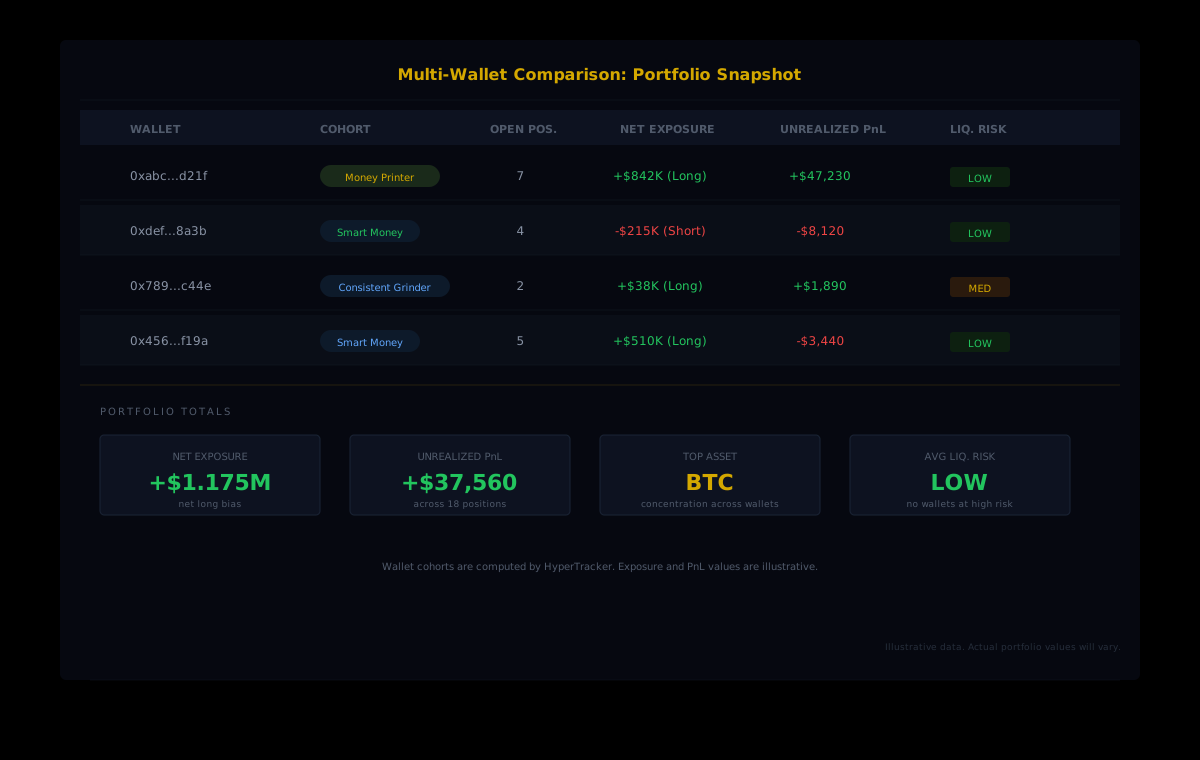
With positions grouped by wallet, the next step is computing portfolio-level aggregates that give you the unified view you are building for.
Net exposure by asset
asset_exposure = defaultdict(float)

for wallet, positions_list in portfolio.items():
    for pos in positions_list:
        sign = 1 if pos["side"] == "Long" else -1
        notional = pos["size"] * pos["entry"] * sign
        asset_exposure[pos["coin"]] += notional

# Result: {"BTC": 842000, "ETH": -215000, "SOL": 38000, ...}
# Positive = net long, negative = net short
This tells you your actual directional exposure across all wallets, aggregated by asset. If wallet A is long BTC and wallet B is short BTC, the net exposure reflects the combined position. You might discover that your "diversified" portfolio is actually a concentrated directional bet on a single asset because multiple wallets are positioned the same way.
Portfolio PnL rollup
# Unrealized PnL across all wallets
total_unrealized = sum(
    pos["unrealized_pnl"]
    for positions_list in portfolio.values()
    for pos in positions_list
)

# Per-wallet PnL breakdown
wallet_pnl = {}
for wallet, positions_list in portfolio.items():
    wallet_pnl[wallet] = sum(p["unrealized_pnl"] for p in positions_list)

# Realized PnL requires /closed-trades (per-wallet loop)
for wallet in wallets:
    resp = requests.get(
        f"{API_BASE}/closed-trades",
        headers=headers,
        params={
            "address": wallet,
            "startTime": "2026-05-21T00:00:00.000Z",
            "endTime": "2026-05-28T00:00:00.000Z"
        }
    )
    trades = resp.json()
    realized = sum(float(t["realizedPnl"]) for t in trades)
    wallet_pnl[wallet] = {
        "unrealized": wallet_pnl.get(wallet, 0),
        "realized_7d": realized
    }
The PnL rollup shows two things: your current mark-to-market across all wallets (unrealized), and your actual closed-trade performance over whatever lookback you choose (realized). Combining both gives you a complete picture of portfolio health.
Adding cohort intelligence to the dashboard
Raw positions and PnL are useful, but they only tell you what your wallets are doing. Cohort data from the /coins/metrics endpoint tells you what the rest of the market is doing, which is the context that makes your portfolio data actionable.
# Get cohort-level positioning for BTC
cohort_data = requests.get(
    f"{API_BASE}/coins/metrics",
    headers=headers,
    params={
        "coin": "BTC",
        "start": "2026-05-28T00:00:00.000Z"
    }
).json()

# Check if your portfolio aligns with smart money
for metric in cohort_data:
    segment_id = metric.get("segmentId")
    if segment_id == 8:  # Money Printer
        mp_long_pct = metric.get("longPercentage", 0)
        print(f"Money Printers: {mp_long_pct}% long BTC")
    elif segment_id == 9:  # Smart Money
        sm_long_pct = metric.get("longPercentage", 0)
        print(f"Smart Money: {sm_long_pct}% long BTC")
Imagine your portfolio is net long BTC across three wallets. Our data from the cohort metrics endpoint shows that Money Printers (wallets with $1M+ in all-time perp profits) are also predominantly long. That cohort alignment is a signal worth knowing. If your portfolio is net long BTC but Money Printers are shifting net short, that is a divergence worth investigating before your next position adjustment.
Rate limit math: how to budget your API calls
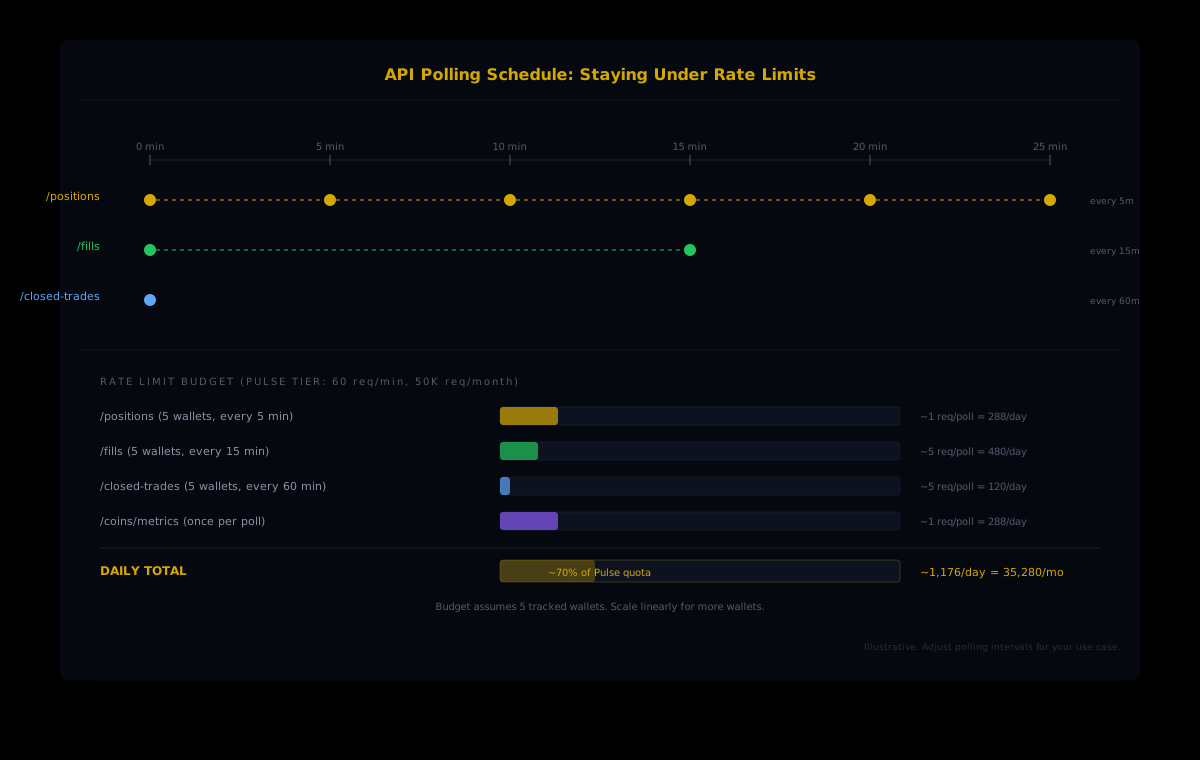
A multi-wallet tracker makes more API calls than a single-wallet tool, which means rate limits matter. On the Pulse tier ($179/mo), you get 50,000 requests per month and a burst limit of 60 requests per minute. Planning your polling schedule up front prevents hitting either ceiling.
Here is how the budget breaks down for a tracker monitoring five wallets:
| Endpoint | Frequency | Calls per Poll | Daily Total | Monthly Total |
| --- | --- | --- | --- | --- |
| /positions | Every 5 min | 1 (multi-address) | 288 | 8,640 |
| /fills | Every 15 min | 5 (1 per wallet/day window) | 480 | 14,400 |
| /closed-trades | Every 60 min | 5 (per-wallet loop) | 120 | 3,600 |
| /coins/metrics | Every 5 min | 1 | 288 | 8,640 |
| Total | | | 1,176 | 35,280 |
At roughly 35,000 requests per month, a five-wallet tracker uses about 70% of the Pulse quota. That leaves headroom for ad-hoc queries, historical lookbacks, and the occasional burst when you want to pull a deeper fills history for analysis. If you are tracking more wallets, the /positions and /coins/metrics calls stay at 1 per poll (they handle multi-address natively), but /fills and /closed-trades scale linearly with the number of wallets.
Staggering requests to stay under burst limits
import asyncio
import aiohttp

POLL_INTERVAL = 300  # 5 minutes in seconds
BURST_LIMIT = 60     # requests per minute on Pulse

async def poll_cycle(session, wallets):
    # Batch 1: positions + cohort metrics (2 requests)
    positions_task = session.get(
        f"{API_BASE}/positions",
        headers=headers,
        params={"address": wallets, "open": True}
    )
    metrics_task = session.get(
        f"{API_BASE}/coins/metrics",
        headers=headers,
        params={"coin": "BTC"}
    )
    positions, metrics = await asyncio.gather(positions_task, metrics_task)

    # Batch 2: fills (stagger to avoid burst)
    # Only run every 3rd cycle (15 min interval)
    if cycle_count % 3 == 0:
        for wallet in wallets:
            await session.get(
                f"{API_BASE}/fills",
                headers=headers,
                params={"address": wallet, "start": today_start, "end": today_end}
            )
            await asyncio.sleep(1)  # 1s gap between fill requests

    # Batch 3: closed trades (every 12th cycle = 60 min)
    if cycle_count % 12 == 0:
        for wallet in wallets:
            await session.get(
                f"{API_BASE}/closed-trades",
                headers=headers,
                params={"address": wallet}
            )
            await asyncio.sleep(1)
Staggering fill and closed-trade requests across cycles keeps your per-minute request count well under the burst limit. The positions endpoint is the only one you need on every cycle, because that is where the real-time state lives.
Handling pagination and edge cases
The /positions and /fills endpoints return up to 500 results per request. For a five-wallet tracker, you will rarely hit this limit on open positions (that would mean an average of 100 open positions per wallet). But fills can accumulate quickly on active trading days, so your code needs to handle cursor-based pagination.
def fetch_all_pages(endpoint, params):
    """Fetch all pages using cursor pagination."""
    all_results = []
    while True:
        resp = requests.get(
            f"{API_BASE}/{endpoint}",
            headers=headers,
            params=params
        )
        data = resp.json()
        all_results.extend(data.get("results", data))

        next_cursor = resp.headers.get("X-Next-Cursor") or \
                      data.get("nextCursor")
        if not next_cursor:
            break
        params["cursor"] = next_cursor

    return all_results
Two other edge cases to plan for. First, the /fills endpoint requires start and end parameters on the same calendar day (ISO 8601 format). If you want a week of fill history, you need to make seven daily requests per wallet. Second, /closed-trades uses startTime and endTime parameters (different naming from /fills). Mixing them up is a common source of empty responses.
Building the portfolio view
With all the data fetched and aggregated, the final step is structuring the output into something you can actually use. A practical portfolio tracker renders three views:
The wallet card view shows each wallet as a card with its cohort badge, open position count, net exposure, unrealized PnL, and liquidation risk. This is the at-a-glance dashboard you check when markets move.
The asset concentration view sums exposure across wallets by asset. If BTC shows up as 65% of your total notional exposure, you know your "diversified multi-wallet strategy" is actually a concentrated BTC bet. This view catches the correlation blind spots that single-wallet interfaces miss entirely.
The PnL attribution view breaks down performance by wallet over time. Using closed-trade data from the past week or month, it shows which wallet is actually making money and which one is bleeding. Combined with cohort data (which PnL cohort each wallet belongs to), you can see whether your best-performing wallet is classified as a Consistent Grinder or a Money Printer, and whether your worst performer has drifted into Exit Liquidity territory.
Start Building Your Multi-Wallet Tracker
HyperTracker's API gives you multi-wallet position queries, cohort classification on every response, and closed-trade history going back to July 2025. The free tier includes 100 requests per day to prototype your tracker before upgrading.
From tracker to alert engine
Once you have the polling loop and aggregation logic running, adding alerts is a small extension that delivers outsized value. Three alert types are worth building first:
Liquidation proximity alert. When any wallet's liquidation progress crosses a threshold you define, fire a notification. The /positions response includes liquidation price for every position, so computing distance-to-liquidation as a percentage of current price is straightforward.
Cohort divergence alert. When your portfolio is net long an asset but the Money Printer cohort shifts net short on the same asset (or vice versa), that divergence is worth a notification. You are betting against the wallets with the strongest cumulative track records.
Concentration alert. When a single asset exceeds a percentage of total portfolio exposure that you set, the alert fires. This catches the slow accumulation problem where multiple wallets independently add to the same asset over days, and you do not notice the combined concentration until a drawdown hits.
Building a multi-wallet portfolio tracker on Hyperliquid is not a weekend project with raw exchange data. You would need to index every wallet's on-chain activity, compute PnL from raw fills, and build your own classification system. With HyperTracker's API, the positions come pre-enriched with cohort classifications, the PnL is computed for you, and the cohort metrics endpoint gives you the market context to make portfolio decisions that account for what smart money is doing. The data layer is solved. The remaining work is the interface you want to see it through.