
Your Hyperliquid Bot Keeps Hitting 429. Fix It for Good.
By CMM Team - 30-Jun-2026
Your Hyperliquid Bot Keeps Hitting 429. Fix It for Good.
You write a bot that polls Hyperliquid for prices every second. It works beautifully in testing. Then you add a second asset. Then five. Then you check positions and funding at the same cadence, because why not. Within minutes, the API starts returning HTTP 429 and your bot goes blind at the worst possible time.
This is the single most common failure mode for new Hyperliquid builders, and the fix is almost never "upgrade to a higher tier." The problem is architectural: most bots treat every endpoint like it costs the same, poll data that barely changes at the same frequency as data that moves every block, and ignore the tools Hyperliquid gives you to avoid REST entirely. Once you understand how the weight system actually works, 429 errors go from an inevitability to something you can engineer around permanently.
This guide breaks down every rate limit Hyperliquid enforces, explains the weight math behind each endpoint category, and walks through the caching, WebSocket, and batching patterns that keep production bots well under budget.
The weight budget: 1,200 per minute, but not all calls are equal
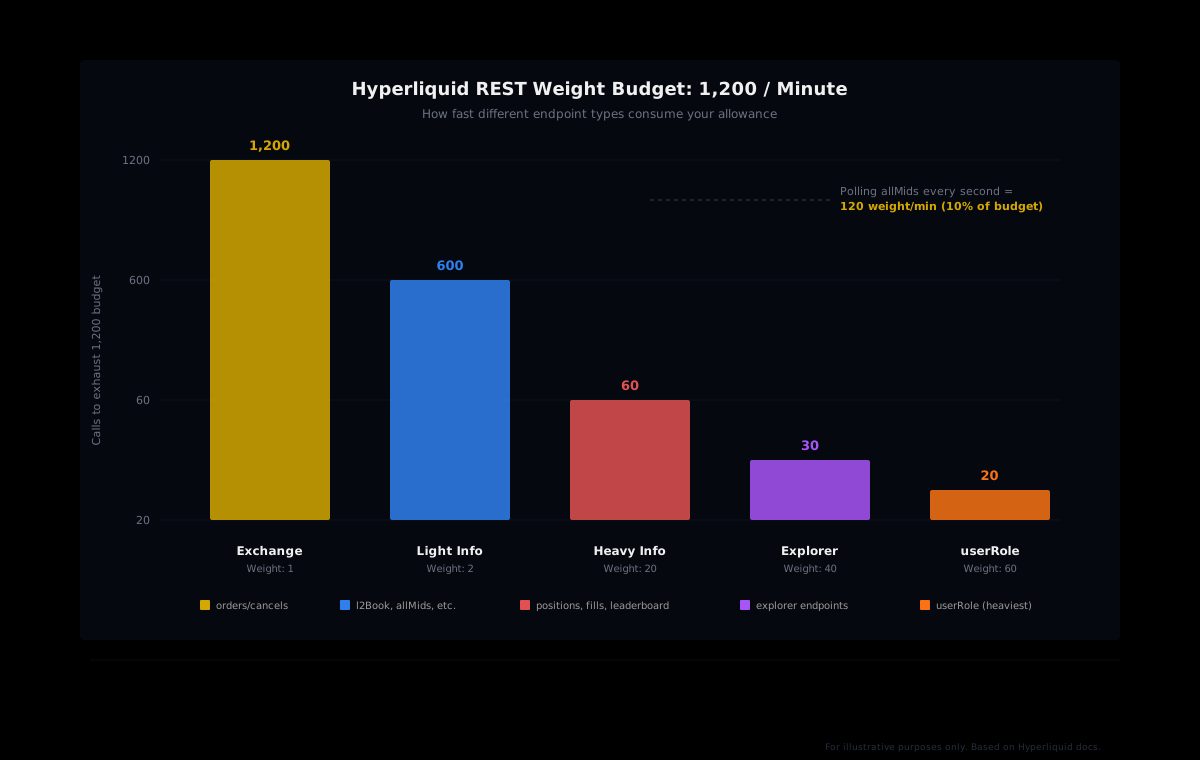
Hyperliquid's REST API uses a weight-based system. Every IP address gets a shared budget of 1,200 weight per minute. But the cost of each request varies dramatically depending on which endpoint you call.
Exchange API requests (placing orders, canceling, modifying) cost a weight of 1 + floor(batch_length / 40). A single order costs 1. A batch of 39 orders also costs 1. A batch of 40 costs 2. This makes batching one of the most effective tools in your rate-limit toolkit.
Info endpoints split into three tiers:
| Tier | Weight | Endpoints |
| --- | --- | --- |
| Light | 2 | l2Book, allMids, clearinghouseState, orderStatus, spotClearinghouseState, exchangeStatus |
| Heavy | 20 | All other documented info requests (positions, fills, funding history, leaderboards) |
| Heaviest | 60 | userRole |
Some endpoints also scale with response size. Calls to recentTrades, historicalOrders, userFills, userFillsByTime, fundingHistory, and several others add additional weight per 20 items returned. The candleSnapshot endpoint adds weight per 60 items. Explorer API requests start at weight 40 plus 1 per block for blockList.
The math is what trips people up. If your bot polls allMids once per second (weight 2 each), that's 120 weight per minute for just price data. Add clearinghouseState checks at the same cadence (another 120), and you're already using 20% of your budget before you've placed a single order. Now layer in a weight-20 endpoint like userFills at the same rate, and you're burning 1,200 weight per minute on fills alone. Budget gone.
The address-based limit most builders forget
IP-based rate limiting is the one everyone knows about, because 429 errors are loud. But Hyperliquid also enforces a separate limit per wallet address, and this one is quieter but just as painful when you hit it.
Every address starts with a buffer of 10,000 requests. After that, your limit grows based on trading volume: one additional request per 1 USDC traded cumulatively since the address was created. An account that has traded $500,000 lifetime gets a budget of 510,000 requests. A brand-new testnet address that has never traded burns through its buffer in hours if you're polling aggressively.
When you hit the address-based limit, the API throttles you to one request every 10 seconds. That's not a hard block, it's a leash. Your bot still functions, but at a crawl. The silver lining: cancel operations get a more generous budget of min(limit + 100,000, limit * 2), so you can always unwind positions even when rate-limited on everything else.
Sub-accounts are treated as separate users for address-based limits, which means distributing operations across sub-accounts can help. But don't confuse this with IP-based limits, which are shared across all traffic from the same IP regardless of which address is making the request.
WebSocket limits: 1,000 subscriptions, not 1,000 per connection
Switching from REST polling to WebSocket subscriptions is the single biggest rate-limit optimization most builders can make. Subscriptions push data to your bot when something changes, consuming zero REST weight. But WebSocket connections come with their own set of limits, and the most common misconception is how subscriptions are counted.
Hyperliquid allows a maximum of 10 simultaneous WebSocket connections per IP, with a cap of 30 new connections per minute. The subscription limit is 1,000 total across all connections. Opening five connections does not give you 5,000 subscriptions. You still get 1,000, shared.
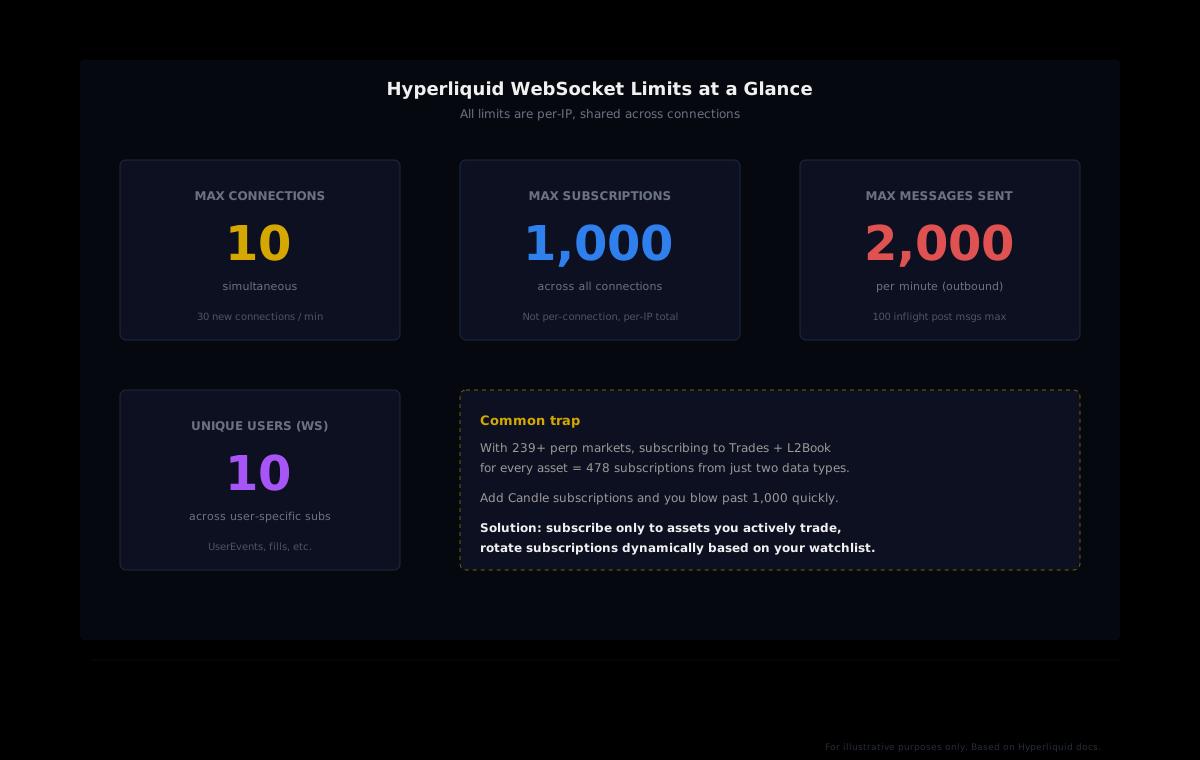
The outbound message limit is 2,000 per minute, with a maximum of 100 simultaneous inflight post messages. User-specific subscriptions (like UserEvents) are limited to 10 unique users per IP.
The subscription math matters. Hyperliquid lists over 200 perpetual contracts. Each asset-data-type pair requires its own subscription. If you subscribe to Trades and L2Book for every asset, that's 400+ subscriptions from just two data types. Add Candle at even one timeframe and you're pushing 600+. Two timeframes and you're past the 1,000 limit.
Managing subscriptions dynamically
Production bots rarely need every feed for every asset at all times. A more effective approach is to maintain a watchlist and rotate subscriptions based on what your strategy actually needs right now. Subscribe to AllMids once for all prices (one subscription), then add asset-specific feeds only for coins you're actively trading or monitoring for entry.
When an asset leaves your watchlist, unsubscribe and free the slot. This pattern keeps you well under 1,000 even if your universe is hundreds of assets wide, because your active set at any given moment is typically much smaller.
What actually happens when you get 429'd
A 429 response from Hyperliquid means your requests are being rejected, but it's a warning shot. The API returns an error message in the response body and may include a Retry-After header telling you exactly how long to wait. Short rate-limit events result in rejected requests, not account bans. But persistent abusive traffic can escalate to more serious consequences.
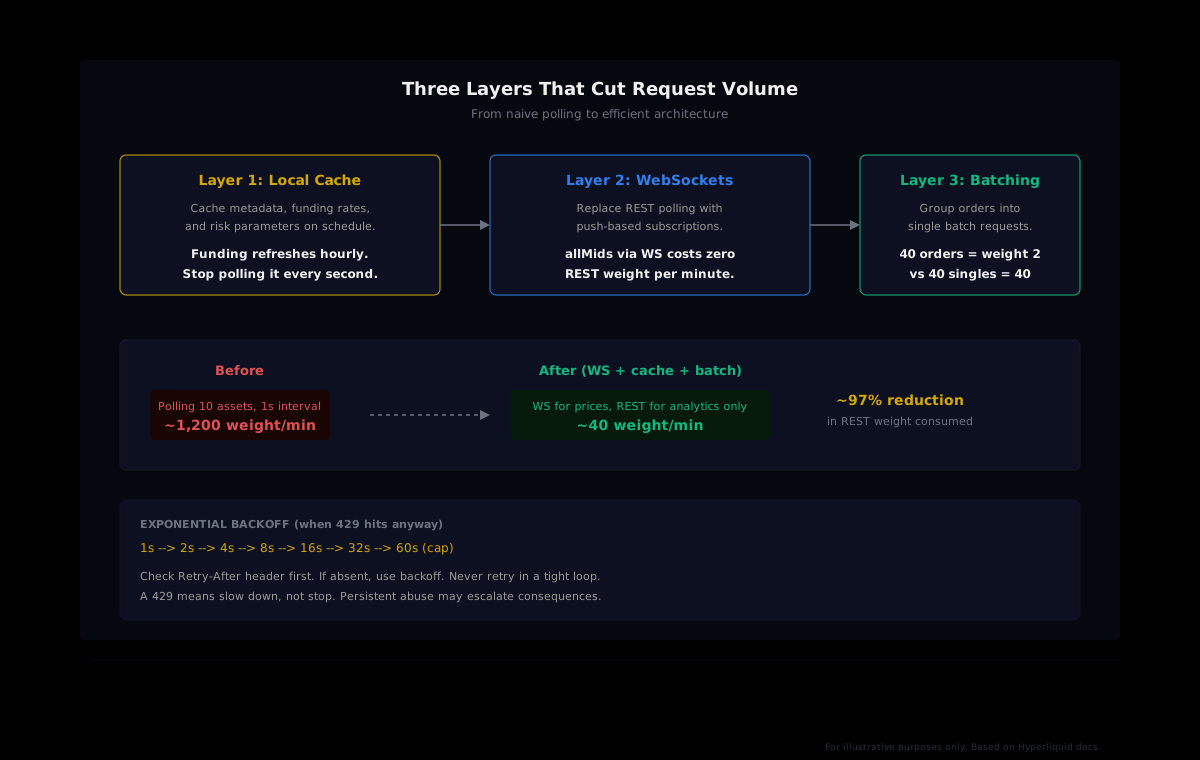
The worst thing your bot can do in response is retry immediately in a tight loop. That creates more 429 errors, extends the rate-limit window, and can turn a brief hiccup into a prolonged outage. Exponential backoff is the standard fix:
- Check the
Retry-Afterheader. If present, wait exactly that long. - If absent, start with a 1-second delay.
- Double the delay after each consecutive failure: 1s, 2s, 4s, 8s, 16s, 32s.
- Cap at 60 seconds. If you're still getting 429s at that point, something deeper is wrong.
- Reset the backoff timer after a successful request.
async def request_with_backoff(endpoint, payload, max_retries=6):
    delay = 1
    for attempt in range(max_retries):
        response = await client.post(endpoint, json=payload)
        if response.status_code != 429:
            return response
        retry_after = response.headers.get("Retry-After")
        wait = int(retry_after) if retry_after else delay
        await asyncio.sleep(wait)
        delay = min(delay * 2, 60)
    raise RateLimitExceeded(f"Still 429 after {max_retries} retries")
Batching: the most underused optimization
Hyperliquid's batching system is remarkably generous. A batch of up to 39 exchange API requests (orders, cancels, modifications) costs the same as a single request: weight 1. A batch of 40 costs weight 2. A batch of 79 is still weight 2. This means a bot that places 30 orders individually burns 30 weight, while the same 30 orders in a single batch burn 1.
There's a critical nuance for address-based limits, though. Batched requests count as one request for IP-based rate limiting but as n requests for address-based rate limiting. So batching saves your IP budget but doesn't save your per-address budget. For most builders, the IP limit is the binding constraint, so batching still delivers the biggest win. Just be aware that a high-frequency bot sending hundreds of batched orders per minute will still eat through the address-based buffer.
Caching: stop re-fetching data that barely moves
Hyperliquid's funding rate settles once per hour. Open interest updates every block but doesn't move meaningfully on a per-second basis for most assets. Exchange metadata (asset lists, specs, margin parameters) changes maybe once a week when new listings go live. Yet most bots poll all of these at the same aggressive cadence they use for price data.
A local cache layer with TTL-based expiration eliminates most of these redundant calls:
- Prices (
allMids): Move to WebSocket. Zero REST weight. - Positions (
clearinghouseState): Poll every few seconds (e.g., 5-15 seconds), cache between polls. - Funding rates: Cache for several minutes (as an example, 10-15 minutes). Rates settle hourly, so even a 15-minute cache would mean checking at most 4 times per settlement window.
- Fills (
userFills): Subscribe viaUserEventsWebSocket for real-time updates. Only poll REST as a reconciliation fallback. - Metadata (asset lists, specs): Cache aggressively (metadata changes infrequently). Check once on startup and refresh periodically.
The combination of WebSocket subscriptions for fast-moving data and cached REST polls for slow-moving data typically reduces total REST weight consumption by over 90% compared to a naive polling architecture. For most bots, this means the 1,200 weight-per-minute budget is more than enough for years of growth without ever hitting a limit.
Separate your data budget from your trading budget
Hyperliquid's docs note that the limits for info and exchange endpoint categories are separate. This is a critical architectural insight. Your market data queries should never compete with your order placement for rate-limit headroom.
In practice, this means structuring your bot with two separate request paths: one for data ingestion (info endpoints, analytics, monitoring) and one for execution (orders, cancels, modifications). If your data layer has a bug that sends a burst of requests, your trading path stays unaffected. If your execution layer is in the middle of a rapid-fire batch cancel during a liquidation event, your data feeds keep flowing.
For builders who use pre-computed analytics, this separation gets even cleaner. Instead of burning your info endpoint budget on raw data processing (pulling fills for hundreds of addresses, computing cohort aggregates, tracking leaderboard changes), you can consume those analytics via a dedicated layer. HyperTracker's API delivers cohort positioning, smart money aggregates, and liquidation risk scoring as pre-computed endpoints, so your bot's Hyperliquid rate-limit budget stays entirely focused on the data only Hyperliquid can provide: prices, your own positions, and order execution.
Build faster, poll less
HyperTracker computes cohort analytics across 16 behavioral segments so your bot doesn't have to scrape hundreds of wallets. One API call replaces thousands of position queries. Start with the free tier.
Monitoring your budget in production
The difference between a bot that "works in testing" and one that runs reliably in production is monitoring. Hyperliquid provides the userRateLimit info endpoint, which returns your current address-based rate limit status, remaining budget, and usage. Querying this periodically (for instance, every 30 seconds) gives you early warning before you hit the wall.
Beyond Hyperliquid's built-in endpoint, instrument your bot to track:
- Requests per minute by endpoint type: Know which endpoints consume the most weight.
- 429 frequency: Any non-zero count means your budget math is off.
- WebSocket reconnection rate: Frequent reconnections might indicate dropped connections consuming your 30-new-connections-per-minute allowance.
- Cache hit rate: A low hit rate means your TTLs are too short or you're not caching endpoints you should be.
- Response latency percentiles (p50, p95, p99): Rising latency can signal approaching rate limits before the 429 actually fires.
Log these metrics, set alerts, and review them weekly. A bot that gradually drifts toward its rate limit as you add assets or strategies will eventually cross it. Better to see the trend early and adjust than to discover it during a volatile market session.
The rate-limit architecture that scales
Here's the stack that keeps production Hyperliquid bots well under budget, no matter how many assets they track:
- WebSocket first: Use
AllMidsfor prices,L2Bookfor depth on active assets,UserEventsfor fills. This eliminates the highest-frequency REST polling. - Cache everything slow: Funding rates, metadata, and historical queries get local TTL caches. Refresh on schedule, not on demand.
- Batch all writes: Group orders, cancels, and modifications into batches. Per the weight formula, batches under 40 cost weight 1.
- Separate data from execution: Use different request managers with independent monitoring. A data bug should never block a trade.
- Offload analytics: Let a pre-computed API like HyperTracker handle cohort intelligence. Spend your Hyperliquid budget on what only Hyperliquid can give you.
- Monitor and alert: Track weight consumption per endpoint, watch for 429 trends, and adjust TTLs or subscription counts before you hit limits.
Every Hyperliquid builder hits 429 at least once. The ones who build lasting products are the ones who redesign their architecture so it never happens again. The tools are all there: weight-based budgeting, generous batching, native WebSocket support, and a userRateLimit endpoint that tells you exactly where you stand. Use them, and the rate limit becomes a guardrail you never touch.