Build a Hyperliquid Webhook Alert System in 30 Minutes
By CMM Team - 10-Jul-2026
Build a Hyperliquid Webhook Alert System in 30 Minutes
Your polling loop fires every five minutes, pulls the same cohort data, compares it to the last snapshot, and decides nothing changed. Meanwhile, the Money Printer cohort just flipped net short on ETH, a liquidation cluster formed around the $3,800 level, and three Leviathans opened fresh longs on SOL. By the time your next poll lands, the move is already priced in.
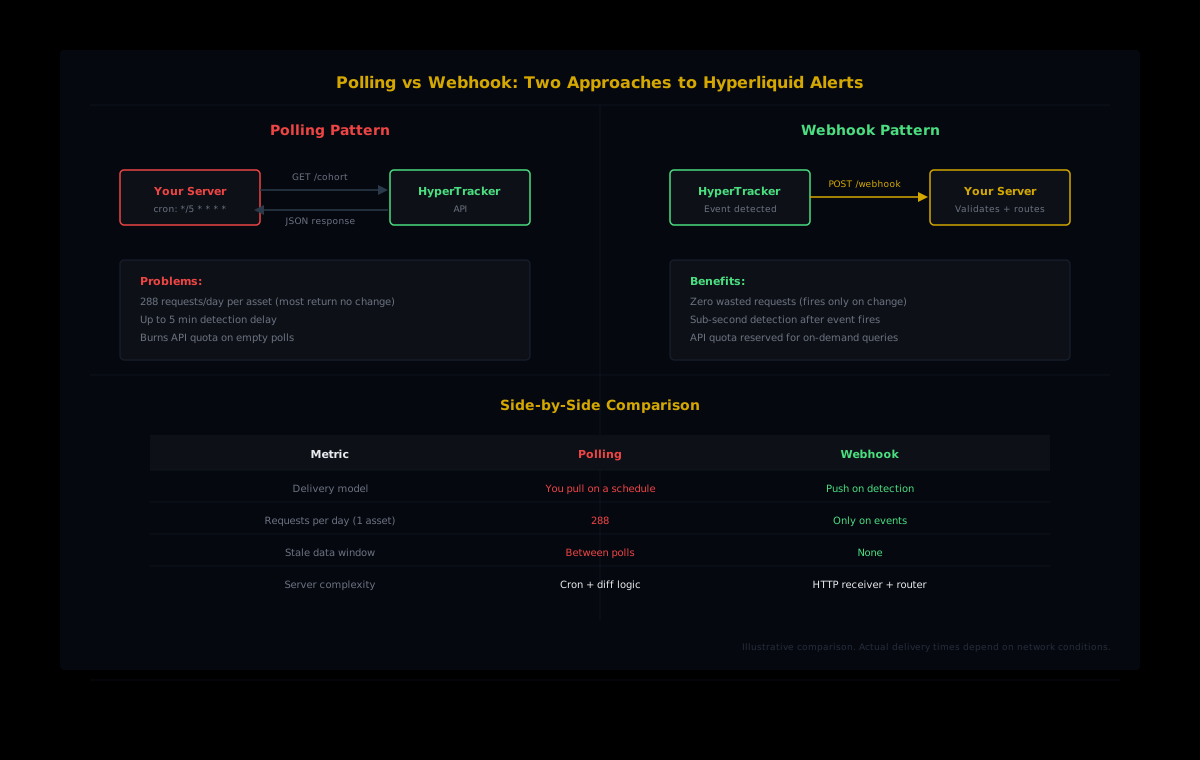
Polling is the default because it is the simplest pattern. You set an interval, hit the endpoint, diff the response, and call it a day. But simplicity costs you latency, wasted API calls on unchanged data, and the nagging feeling that something important happened between your last two requests. Webhooks flip that model. Instead of asking "did anything change?" every few minutes, the server tells you the moment something does.
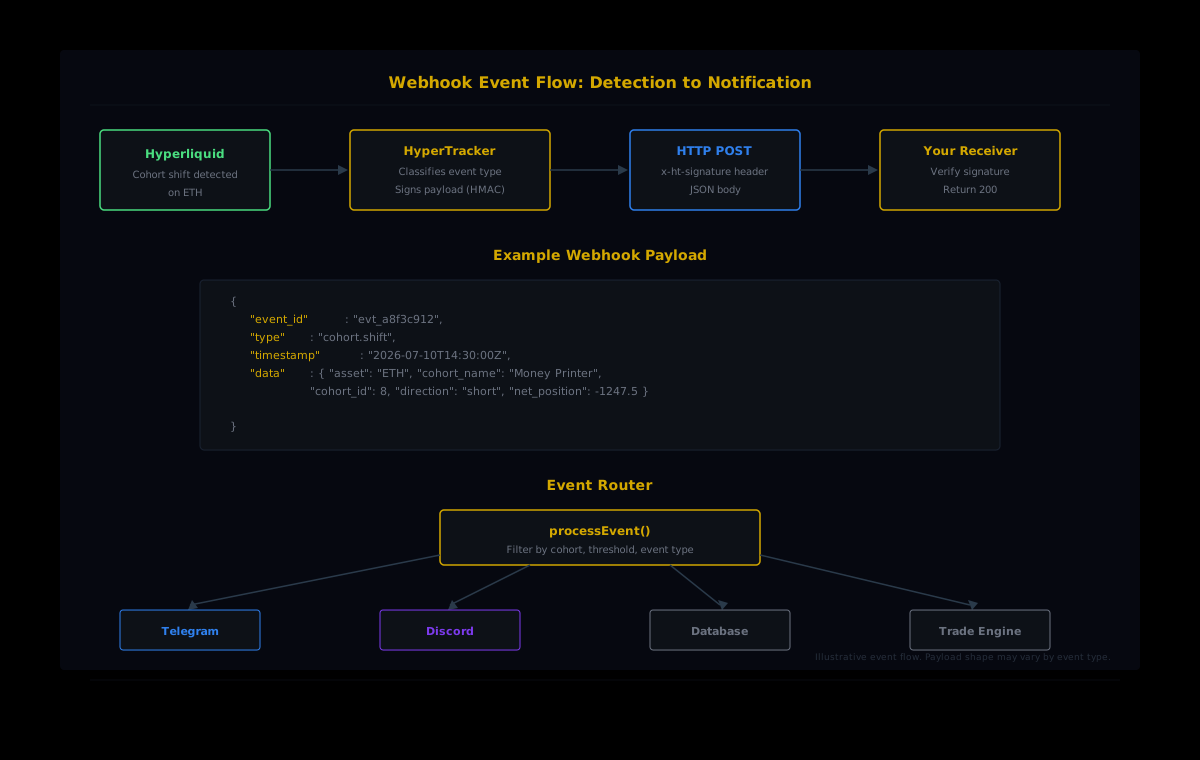
HyperTracker's webhook delivery is available on the Flow ($799/mo) and Stream ($1,999/mo) tiers. You register a URL, configure which events you care about, and our infrastructure pushes a signed JSON payload to your endpoint as soon as an event is detected on our data refresh cycle. No cron jobs, no rate limit arithmetic, no stale data windows. This guide walks through the full setup: receiving webhooks, validating payloads, routing alerts to Telegram or Discord, and handling failures gracefully.
Polling versus push: what you are actually losing
The cost of polling is not just latency. Consider the math on a typical integration. If you poll the cohort metrics endpoint every five minutes, that is 288 requests per day, or roughly 8,640 per month, for a single endpoint on a single asset. Add five assets and you are at 43,200 requests. Add order flow snapshots and liquidation risk, and you can burn through a Pulse tier's 50,000 monthly requests on monitoring alone, with zero budget left for on-demand queries.
Webhooks eliminate this entirely. You register for the events you care about, and requests only fire when something actually changes. A quiet market costs you nothing. A volatile day sends a burst of payloads, but each one carries actionable information rather than a "no change" response you have to process and discard.
The latency gap matters too. With five-minute polling, your worst-case detection delay is just under five minutes, and you carry all the request overhead even when nothing changes. With webhooks, you receive the payload the moment our system detects the event on its refresh cycle, with zero wasted calls in between. For cohort shifts and liquidation spikes, eliminating the polling overhead and getting instant push delivery means cleaner architecture and faster reaction loops.
Setting up your webhook endpoint
The receiver is just an HTTP server that accepts POST requests, validates the payload, and returns a 200 status code quickly. Your endpoint should respond within a few seconds to avoid triggering retry logic. If the delivery fails, it is retried with exponential backoff. Persistent failures will pause the webhook until you re-enable it from the dashboard.
Here is a minimal Node.js receiver using Express:
import express from 'express';
import crypto from 'crypto';

const app = express();
app.use(express.json());

const WEBHOOK_SECRET = process.env.HT_WEBHOOK_SECRET;

function verifySignature(payload, signature) {
  const expected = crypto
    .createHmac('sha256', WEBHOOK_SECRET)
    .update(JSON.stringify(payload))
    .digest('hex');
  return crypto.timingSafeEqual(
    Buffer.from(signature),
    Buffer.from(expected)
  );
}

app.post('/webhooks/hypertracker', (req, res) => {
  const signature = req.headers['x-ht-signature'];

  if (!signature || !verifySignature(req.body, signature)) {
    console.error('Invalid webhook signature');
    return res.status(401).json({ error: 'Invalid signature' });
  }

  // Acknowledge immediately, process async
  res.status(200).json({ received: true });

  // Handle the event
  processEvent(req.body);
});

app.listen(3000, () => console.log('Webhook receiver on :3000'));
Three things to note. First, signature verification is not optional. Without it, anyone who discovers your endpoint URL can send fake payloads. The HMAC-SHA256 check confirms the payload originated from HyperTracker. Second, acknowledge before you process. Send the 200 immediately, then handle the business logic asynchronously. If your alert routing hits a slow downstream service (Telegram API hiccup, database write), you do not want the webhook delivery to time out and trigger a retry. Third, use timingSafeEqual for the comparison to prevent timing attacks on the signature.
Exposing your local server
During development, your localhost is not reachable from the internet. Use a tunnel to expose it:
# Option 1: ngrok
ngrok http 3000

# Option 2: Cloudflare Tunnel
cloudflared tunnel --url http://localhost:3000
Copy the generated HTTPS URL and paste it into the HyperTracker webhook configuration. In production, deploy to any cloud provider that gives you a stable HTTPS endpoint. A $5/month VPS is enough for a webhook receiver.
Choosing which events to subscribe to
Not every event deserves an alert. The quickest way to ruin a notification channel is to flood it with noise until you start ignoring everything. Start with a focused set of high-signal events, then expand once you have a feel for the volume.
A practical starting configuration for a trader monitoring Hyperliquid:
| Event type | What it fires on | Why it matters |
| --- | --- | --- |
| cohort.shift | A PnL cohort flips net long/short on an asset | Money Printer or Smart Money reversals are high-conviction signals |
| liquidation.cluster | Liquidation risk score exceeds a threshold | Cluster zones attract price, especially during volatile sessions |
| position.large | A position above a notional threshold opens or closes | Whale entries and exits move markets on Hyperliquid |
| order_flow.spike | Order flow volume in a 5-min window crosses a z-score threshold | Sudden flow surges often precede directional moves |
You configure these in the HyperTracker dashboard under Settings > Webhooks, or programmatically via the webhook management endpoints. Each event type accepts optional filters: asset symbol, cohort ID, minimum notional size, and threshold values. Filtering at the source is always better than filtering in your receiver, because it reduces payload volume and keeps your processing logic clean.
Routing alerts to Telegram
Telegram is the default notification channel for crypto traders because it is fast, supports rich formatting, and runs on every device. The routing function takes the validated webhook payload and sends a formatted message to your Telegram chat or group.
async function sendTelegramAlert(event) {
  const TELEGRAM_TOKEN = process.env.TELEGRAM_BOT_TOKEN;
  const CHAT_ID = process.env.TELEGRAM_CHAT_ID;

  const message = formatMessage(event);

  await fetch(
    `https://api.telegram.org/bot${TELEGRAM_TOKEN}/sendMessage`,
    {
      method: 'POST',
      headers: { 'Content-Type': 'application/json' },
      body: JSON.stringify({
        chat_id: CHAT_ID,
        text: message,
        parse_mode: 'HTML',
      }),
    }
  );
}

function formatMessage(event) {
  switch (event.type) {
    case 'cohort.shift':
      return [
        `<b>Cohort Shift: ${event.data.asset}</b>`,
        `${event.data.cohort_name} flipped <b>${event.data.direction}</b>`,
        `Net position: ${event.data.net_position.toFixed(2)}`,
        `Time: ${new Date(event.timestamp).toUTCString()}`,
      ].join('\n');

    case 'liquidation.cluster':
      return [
        `<b>Liquidation Cluster: ${event.data.asset}</b>`,
        `Risk score: ${event.data.risk_score}/100`,
        `Price zone: $${event.data.price_low} - $${event.data.price_high}`,
        `Estimated exposure: $${(event.data.notional / 1e6).toFixed(1)}M`,
      ].join('\n');

    default:
      return `<b>${event.type}</b>\n${JSON.stringify(event.data, null, 2)}`;
  }
}
To create your Telegram bot, message @BotFather on Telegram, run /newbot, and save the token. Add the bot to your alert channel or group, then grab the chat ID from the getUpdates endpoint. The whole process takes about two minutes.
Discord alternative
If your team runs on Discord, webhook delivery is even simpler. Discord channels have built-in webhook URLs. No bot token management required:
async function sendDiscordAlert(event) {
  const DISCORD_WEBHOOK_URL = process.env.DISCORD_WEBHOOK_URL;

  await fetch(DISCORD_WEBHOOK_URL, {
    method: 'POST',
    headers: { 'Content-Type': 'application/json' },
    body: JSON.stringify({
      embeds: [{
        title: `${event.type}: ${event.data.asset}`,
        description: formatMessage(event),
        color: event.data.direction === 'long' ? 0x22c55e : 0xef4444,
        timestamp: event.timestamp,
      }],
    }),
  });
}
The processEvent router
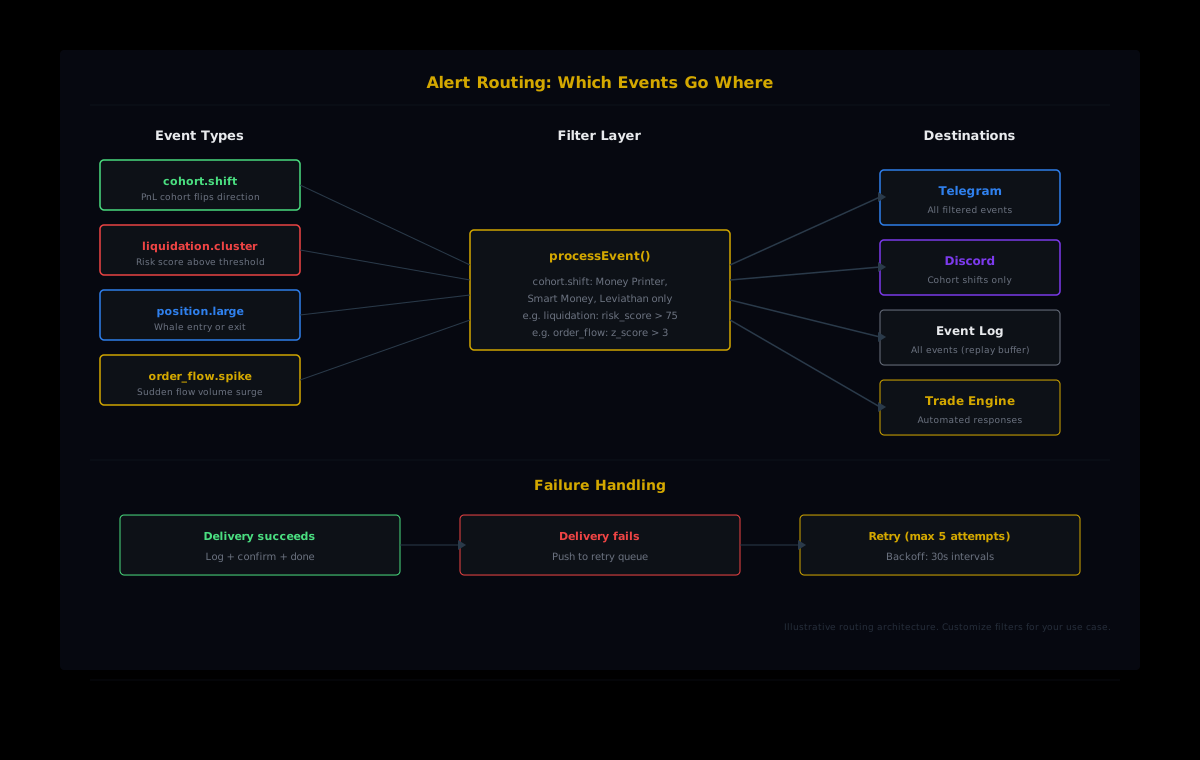
With the receiver and the delivery channels set up, the router ties them together. This is where you decide which events go where, apply any local filtering, and add persistence for debugging.
async function processEvent(event) {
  // Log every event for debugging and replay
  console.log(JSON.stringify({ ts: Date.now(), event }));

  // Route by event type and severity
  switch (event.type) {
    case 'cohort.shift':
      // Only alert on the high-conviction cohorts
      const alertCohorts = [
        'Money Printer', 'Smart Money', 'Leviathan', 'Tidal Whale'
      ];
      if (alertCohorts.includes(event.data.cohort_name)) {
        await sendTelegramAlert(event);
        await sendDiscordAlert(event);
      }
      break;

    case 'liquidation.cluster':
      // Adjust threshold to your risk tolerance
      if (event.data.risk_score > 75) {
        await sendTelegramAlert(event);
      }
      break;

    case 'position.large':
      await sendTelegramAlert(event);
      break;

    case 'order_flow.spike':
      // Example: z > 3 catches extreme spikes. Tune for your strategy.
      if (event.data.z_score > 3) {
        await sendTelegramAlert(event);
      }
      break;

    default:
      console.log('Unhandled event type:', event.type);
  }
}
Notice the filtering layer. The cohort.shift handler only fires alerts for Money Printer, Smart Money, Leviathan, and Tidal Whale. These are the cohorts where directional shifts carry the most signal: wallets with $1M+ in cumulative profit (Money Printer), $100K to $1M (Smart Money), and the largest account sizes ($1M to $5M for Tidal Whale, $5M+ for Leviathan). A shift from Shrimp or Fish cohorts is not meaningless, but it generates too much noise for a notification channel that you need to trust.
Handling failures without losing events
Distributed systems fail. Your server goes down for a deploy. Telegram rate-limits you during a volatile hour. Discord returns a 502 for thirty seconds. If your alert pipeline does not handle these failures, you miss the events that matter most: the ones that fire during chaos.
Two patterns that work well together:
1. Local retry queue
When a delivery channel fails, push the event into a retry queue instead of dropping it. A simple in-memory array works for low-volume setups. For production, use Redis or a durable queue:
const retryQueue = [];

async function safeDeliver(deliverFn, event, channel) {
  try {
    await deliverFn(event);
  } catch (err) {
    console.error(`Delivery failed (${channel}):`, err.message);
    retryQueue.push({ deliverFn, event, channel, attempts: 1 });
  }
}

// Process retries every 30 seconds
setInterval(async () => {
  const batch = retryQueue.splice(0, 10);
  for (const item of batch) {
    try {
      await item.deliverFn(item.event);
    } catch {
      item.attempts++;
      if (item.attempts < 5) retryQueue.push(item);
      else console.error('Dropped after 5 retries:', item.event.type);
    }
  }
}, 30_000);
2. Event log for replay
Log every incoming webhook to a file or database before routing it. If you discover a bug in your formatting logic or miss a delivery channel, you can replay the log to backfill alerts. The JSON logging line in processEvent above is the simplest version of this. For production, append to a file or write to a SQLite table.
Testing your webhook pipeline
Before relying on real market events, validate your pipeline end to end with synthetic payloads. Send a test POST to your local endpoint with a realistic payload shape:
curl -X POST http://localhost:3000/webhooks/hypertracker \
  -H "Content-Type: application/json" \
  -H "x-ht-signature: test-skip-in-dev" \
  -d '{
    "event_id": "test-001",
    "type": "cohort.shift",
    "timestamp": "2026-07-10T14:30:00Z",
    "data": {
      "asset": "ETH",
      "cohort_name": "Money Printer",
      "cohort_id": 8,
      "direction": "short",
      "net_position": -1247.5
    }
  }'
Check that your Telegram channel or Discord server receives the formatted alert. Then test the failure path: kill your Telegram bot token temporarily, send another test event, and verify it lands in the retry queue. These two checks, happy path and failure path, catch most integration issues before you go live.
The HyperTracker dashboard also includes a "Send test event" button on the webhook configuration page. This fires a real payload shape through the production delivery pipeline, so you can validate your endpoint is reachable and responding correctly without waiting for a market event.
From alerts to automation
Once the alert pipeline is running, the natural next step is acting on those signals programmatically. The same processEvent function that routes to Telegram can also trigger trades, adjust positions, or update a dashboard. A cohort shift from Money Printer going net short on BTC could automatically tighten your stop losses. A liquidation cluster forming above current price could trigger a hedge.
The architecture scales because webhooks decouple detection from action. Your receiver handles the "something happened" layer. Separate modules handle the "what do we do about it" layer. You can add a new action (post to Slack, log to a database, trigger a TradingView alert) without touching the receiver or the signature validation.
HyperTracker classifies every wallet on Hyperliquid into 16 behavioral cohorts: eight by account size (Shrimp through Leviathan) and eight by all-time PnL (Money Printer through Giga-Rekt). When those classifications shift in aggregate, the webhook fires. Your job is deciding what that shift means for your positions and wiring the response.
Start building with webhooks
Webhook delivery is available on HyperTracker's Flow ($799/mo) and Stream ($1,999/mo) tiers. Flow gives you webhooks plus 400,000 monthly API requests and 200 requests/minute rate limiting. Stream adds WebSocket delivery, 2 million monthly requests, and 500 requests/minute. Both include the full cohort analytics, order flow, and liquidation risk endpoints that power the alert events shown in this guide.
Explore HyperTracker API tiers
Most trading infrastructure starts with a polling loop because that is what the tutorials show. The builders who ship production-grade systems move to push delivery as soon as they can, because every minute of latency in signal detection compounds into missed trades and stale alerts. Thirty minutes of setup now saves you from debugging a flaky cron job at 3 AM when the market is moving.