
API Rate Limiting Solutions: Scaling Hyperliquid Data Consumption for High-Frequency Strategies
By CMM Team - 28-Apr-2026
API Rate Limiting Solutions: Scaling Hyperliquid Data Consumption for High-Frequency Strategies
The first sign your Hyperliquid bot has outgrown its plumbing is almost always the same. A 429 lands in your error log at 02:14 UTC, your worker backs off, two minutes later it lands again, and by the time you wake up the trade you cared about has already played out. You bump the polling interval, the same thing happens a week later. You scale up to a bigger plan, the wall just moves out by a factor of three. The issue was never the tier. It was the architecture.
Rate limits exist because every backend on Earth has finite capacity and a fairness obligation to other tenants. The question is not how to bypass them. It is how to extract the most useful work per request you spend, so the limit you bump into is the one that actually matches your bot's edge. This guide walks through the rate limits on the HyperTracker tiers, the cheap optimizations most builders skip, the architectural shifts that change the math, and how to read your own usage patterns to know when to upgrade and when to optimize.
The short version: caching, batching, and switching from polling to event-driven delivery typically cut request volume by 5 to 20 times. If you are hitting limits on Pulse or Surge, optimize first. If you are still hitting limits after that, you have an honest scaling problem and Flow or Stream is the right answer.
The wall every Hyperliquid bot hits eventually
Bot scaling on Hyperliquid follows a predictable arc. Week one, you wire up a single asset, poll every minute, ship in an afternoon. Week three, you add a second asset, then a third, then funding context, then liquidation risk, then cohort positioning. Week six, the worker that started as a tidy fetch loop is making four hundred requests a minute against a ceiling of one hundred and your error log is a wall of 429s.
The instinct at this point is to upgrade tier. Sometimes that is right. More often, the bot is doing redundant work. It is re-fetching cohort metrics that have not changed because our backend recomputes them every five minutes and the bot polls every thirty seconds. It is hitting the position metrics endpoint for ten coins inside a single tick when one batched call would do. It is treating the API as a stateless oracle when it could be treating it as an event feed.
Before any upgrade conversation, the right diagnostic is a thirty-minute usage audit. Pull your last 24 hours of API logs, group by endpoint, and ask three questions. How many of those calls returned data identical to the previous response? How many calls inside a single tick could have been a single batched request? How many calls would you have skipped if you had been notified by Webhook instead of polling? The answer to those three questions is almost always the upgrade you actually need.
How rate limits work on HyperTracker
Every HyperTracker tier carries two distinct budgets. The per-minute rate limit caps how fast you can call. The monthly request quota caps how much total work you can do. Hitting either ceiling returns a 429 and stalls your bot until the window resets. Most builders only think about one of them, then get surprised by the other.
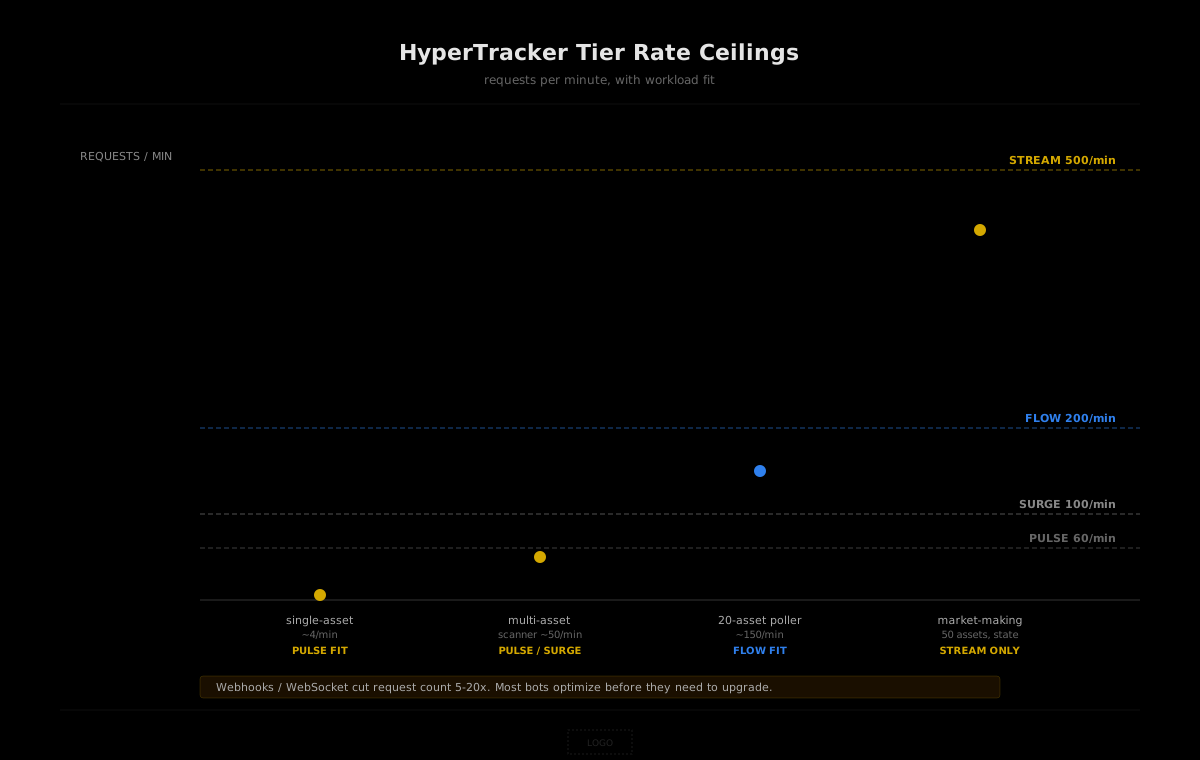
Here is the full picture across tiers, including the transports each plan unlocks. Free tier sits below this table at 100 requests per day with no per-minute floor worth planning around.
| Tier | Price | Per-minute | Per-month | Webhooks | WebSocket | | --- | --- | --- | --- | --- | --- | | Pulse | $179/mo | 60/min | 50K | No | No | | Surge | $399/mo | 100/min | 150K | No | No | | Flow | $799/mo | 200/min | 400K | Yes | No | | Stream | $1,999/mo | 500/min | 2M | Yes | Yes |
Two practical observations. First, the per-month quota usually runs out before the per-minute limit becomes a constraint, unless your bot fans out to many assets simultaneously. A Pulse plan at 50,000 requests per month works out to roughly 70 requests per hour averaged over thirty days. If your bot polls one asset on a one-minute cadence around the clock, you spend 43,200 requests just on that one loop with no headroom for retries, backfills, or context queries. Second, the per-minute limit only bites when you fan out. A bot that sweeps fifty coins in a tight loop will hit 60 per minute on Pulse before it hits the monthly cap, even if the monthly cap is far from full.
The right way to read these numbers is as two separate budgets you tune independently. Caching reduces both. Batching reduces per-month. Event-driven delivery reduces both dramatically. We will walk through each.
The cheap fixes most bots skip
Three optimization patterns cost almost nothing to implement and routinely cut request volume by 5 to 10 times. Builders skip them because they sound obvious until you measure your own bot and discover it has been doing the wasteful thing for six weeks straight.
Cache aligned to the refresh cycle
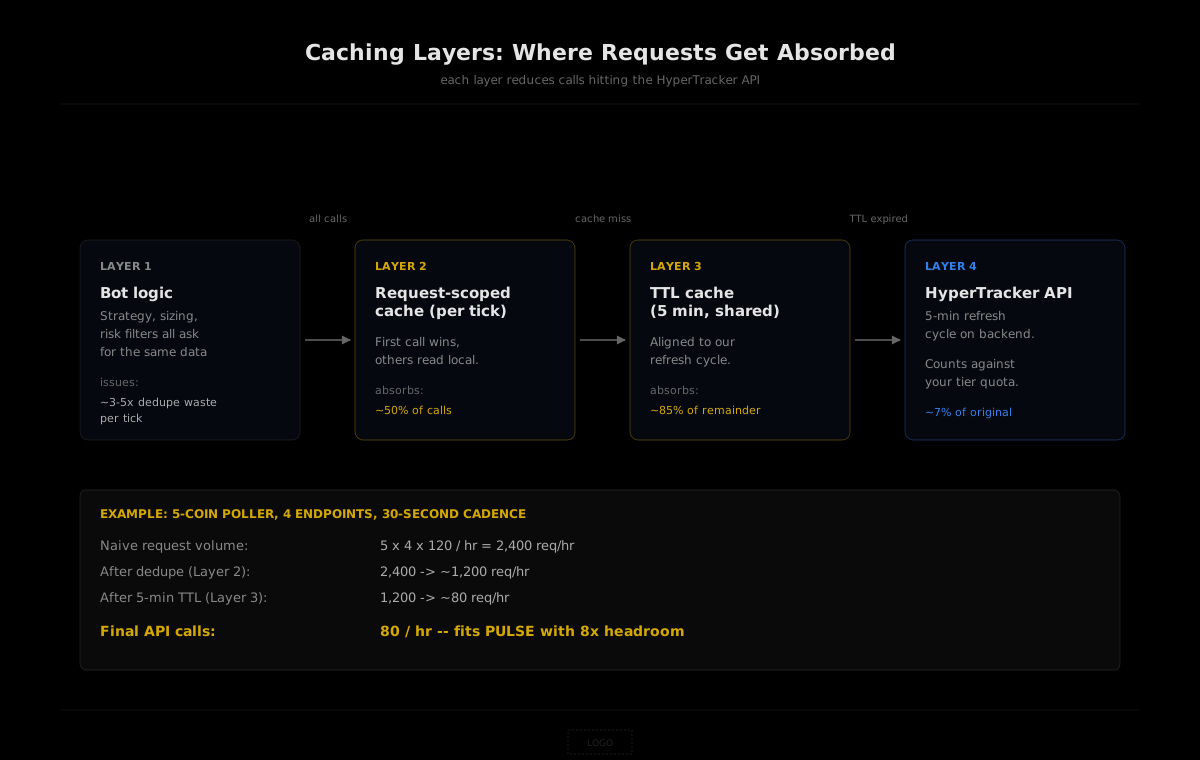
Our cohort and order-flow intelligence refreshes every five minutes. Funding settles every hour on Hyperliquid itself, which means our funding-related aggregates do not move faster than the chain does. There is no point polling either of those at thirty-second intervals. The data on the wire will be byte-identical to the last call.
The fix is a small in-memory cache keyed by endpoint and parameter set, with a TTL that matches the underlying refresh cadence. For cohort and order-flow endpoints, a five-minute TTL is correct. For funding metrics, anywhere from five to thirty minutes works depending on how reactive your strategy is. The implementation is twenty lines:
const cache = new Map();
const TTL_MS = 5 * 60 * 1000;

async function cachedFetch(url, headers) {
  const hit = cache.get(url);
  if (hit && Date.now() - hit.ts < TTL_MS) return hit.body;
  const res = await fetch(url, { headers });
  if (!res.ok) throw new Error(`HTTP ${res.status}`);
  const body = await res.json();
  cache.set(url, { body, ts: Date.now() });
  return body;
}
For a single-asset bot polling four endpoints every thirty seconds, this drops effective request volume from 480 per hour to roughly 48. That is a 10x reduction in monthly spend with no change to the strategy.
Deduplicate inside a tick
The other waste pattern is requesting the same data twice within a single decision tick. Most bots evolve a structure where the entry condition checks one set of metrics, the position-sizing logic checks another, and the risk filter checks a third. By the time the bot fires, it has called /cohort-bias three times in two seconds because three different functions all needed it.
The fix is a request-scoped cache with a TTL of zero or a few seconds. Same shape as the in-memory cache above, but cleared at the end of every tick. Whichever function asks first pays the network cost. Everyone else reads the local copy. On bots with deeply nested logic, this pattern alone can halve request volume.
Batch where the API supports it
Several HyperTracker endpoints accept comma-separated parameter lists or array payloads that return data for many assets in one call. The position metrics surface, leaderboard queries, and several cohort endpoints fall into this category. Wherever you have a loop that hits the same endpoint once per coin, check the docs for a batched form first. One call returning ten coins is one tenth the request count and is also faster wall-clock because you pay TLS handshake and connection overhead once instead of ten times.
This single fix is what tips many multi-asset scanners from "needs Surge" back into "fits comfortably on Pulse."
The architectural shift that changes the math
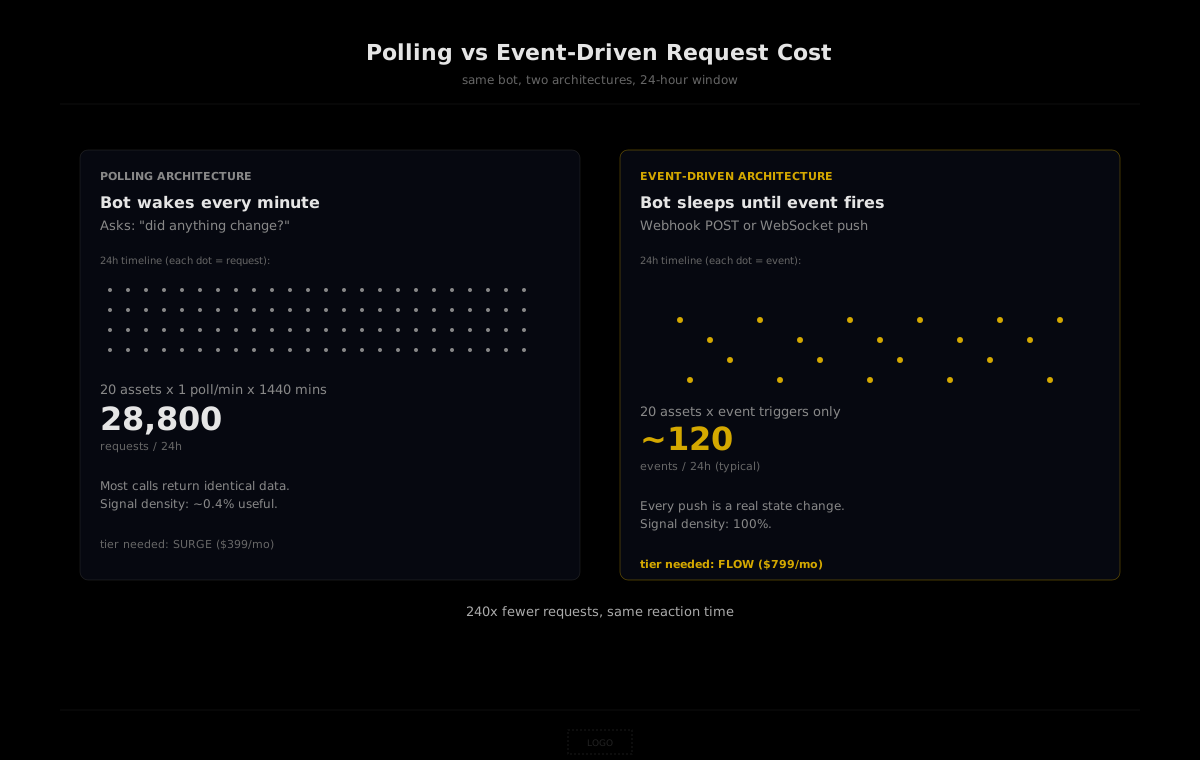
The optimizations above squeeze more work out of the same polling architecture. The bigger lever is to stop polling for data that has not changed yet. A polling bot wakes on a timer and asks "is there news?" An event-driven bot sleeps until news arrives. The second design pays roughly zero requests during quiet periods and exactly one per relevant event.
HyperTracker offers two event-driven transports. Webhooks fire a POST to an endpoint you own when a configured event triggers, and they ship on Flow ($799/mo) and Stream ($1,999/mo). WebSocket pushes a stream of updates over a persistent connection, available only on Stream ($1,999/mo). Both are delivery mechanisms layered on top of our five-minute refresh cycle. They do not push faster than the underlying state changes. They push as soon as the next refresh lands, so your bot reacts in roughly five minutes instead of the average of the polling interval plus the refresh cadence.
The math comparison is the part most builders find counterintuitive. A bot watching cohort flips on twenty assets, polling every minute on a Surge plan, fires 28,800 requests a day and fits inside the 150K monthly cap with about half the budget left. The same bot on Webhooks fires roughly 60 to 120 events per day across all twenty assets, because most cohort metrics do not flip on most coins on most days. The Webhook architecture uses one to two percent of the request budget the polling architecture uses. The reaction time is the same or better. The infrastructure complexity is lower because the bot wakes only when it has something to do.
The flip side is operational. Webhooks require a public HTTPS endpoint, signature validation, and idempotency handling because retries are at-least-once. WebSocket requires reconnect logic with exponential backoff, channel resubscription on reconnect, and a state-reconciliation pass via REST after long disconnects. We covered the operational details in our companion piece on WebSocket versus REST. The summary: the savings on request budget are real and large, the complexity tax is real and modest, and the right choice depends on whether your bot is event-shaped or sweep-shaped.
Tier-by-tier: which workloads each plan supports
Read the tiers as architecture brackets, not as feature ladders. Each plan supports a class of workload cleanly. Past that ceiling, the next tier exists for a reason.
Pulse ($179/mo, 60/min, 50K/mo)
The right home for single-asset bots, slow-edge swing strategies, and dashboards. A bot polling four endpoints every five minutes around the clock spends about 35,000 requests a month, comfortably under the cap with headroom for retries and backfills. Add proper caching and a five-coin scanner fits here too. Most builders who think they have outgrown Pulse have actually just skipped the caching pass.
Surge ($399/mo, 100/min, 150K/mo)
The right home for multi-asset scanners, internal tools that aggregate across the basket, and bots that need higher fan-out per minute. The 100 per minute ceiling lets you sweep ten to fifteen assets inside a single tick without hitting the burst cap. The 150K monthly quota covers a polling cadence of one minute per asset across twenty coins with cache headroom. If you are running a single-asset bot at this tier, you almost certainly have an optimization opportunity.
Flow ($799/mo, 200/min, 400K/mo, Webhooks)
The right home for event-driven bots and reactive systems. The Webhook delivery alone usually pays for the upgrade by cutting request count to a sliver of what the equivalent polling bot would spend. The 400K REST budget is for context queries you fire after a Webhook lands, plus any backfills or admin work. Bots that wait for cohort flips, liquidation thresholds, or funding extremes belong here.
Stream ($1,999/mo, 500/min, 2M/mo, Webhooks + WebSocket)
The right home for multi-asset market-making bots, persistent-state systems that recompute on every refresh, and any workload where a single WebSocket subscription delivers updates that would have been thousands of REST calls a day. The 2M REST quota is for everything that does not flow through the socket. If your bot's architecture is "one connection, fifty channels, mutate state on every message," this is the only tier that fits.
Production patterns worth shipping early
Rate-limit handling is one of those areas where the difference between a bot that runs for a year and a bot that quietly dies in week three is a few hundred lines of operational code. Three patterns earn their place on every production deployment.
Exponential backoff with jitter
When you do hit a 429, the worst possible response is to retry immediately. The second worst is to retry on a fixed interval, because every other client running the same code retries at the same time and creates a thundering herd. The pattern that works is exponential backoff with random jitter:
async function fetchWithBackoff(url, headers, attempt = 0) {
  const res = await fetch(url, { headers });
  if (res.status !== 429) return res;
  if (attempt >= 6) throw new Error('rate limit, gave up after 6 retries');
  const base = Math.min(1000 * Math.pow(2, attempt), 30000);
  const jitter = Math.random() * base * 0.3;
  await new Promise(r => setTimeout(r, base + jitter));
  return fetchWithBackoff(url, headers, attempt + 1);
}
Cap retries at six attempts and roughly thirty seconds of total backoff. Past that, log the failure and let the next tick handle it. The bot that retries forever is the bot that wedges silently when our backend has a bad five minutes.
Circuit breaker for cascading failures
If half your last twenty calls returned errors, your bot should stop calling for a minute. That is a circuit breaker, and it protects two things. It protects our backend from a stampede when something is genuinely wrong. It protects your bot from burning its monthly quota on calls that are never going to succeed. The simplest implementation tracks a rolling error rate over the last N calls and short-circuits new requests when the rate crosses a threshold:
const errors = [];
function recordOutcome(ok) {
  errors.push({ ok, ts: Date.now() });
  while (errors.length > 20) errors.shift();
}
function shouldShortCircuit() {
  const recent = errors.filter(e => Date.now() - e.ts < 60_000);
  if (recent.length < 10) return false;
  const failureRate = recent.filter(e => !e.ok).length / recent.length;
  return failureRate > 0.5;
}
Combine with backoff and you have a bot that gets out of the way when things are broken and resumes cleanly when they are fixed.
Request prioritisation
Not every call your bot makes is equally important. The cohort flip that triggers the entry decision is critical. The position metrics call that updates a UI badge is not. When you are running close to a rate limit, the bot should serve the critical calls first and shed the cosmetic ones. Two queues solve this. The hot queue runs without throttle. The cold queue runs only when the rate limit window has headroom. Most internal-tool bots never need this, but any bot driving real capital should treat its request budget as a tiered resource.
When to upgrade versus when to optimize
The honest test is whether your bot is request-bound for reasons of architecture or for reasons of scope. If you are polling redundant data, fetching the same metrics from three different code paths, or sweeping ten coins one at a time when one batched call would do, you are architecture-bound and a tier upgrade just buys you a bigger margin to waste. Optimize first.
If your bot has been through the optimization passes already and is genuinely tracking more assets, more events, or more state than the current tier supports, you are scope-bound and the upgrade is the right move. The signal is usually that your per-minute limit hits before your monthly cap fills, which means you are fan-out-constrained rather than rate-of-update-constrained, which means you have moved past the point where polling can scale and Webhooks or WebSocket are the answer.
One useful rule of thumb. If you cannot describe your bot's behaviour without listing at least twenty assets and a state machine, you want Stream. If you can describe it as "when X happens, fire Y," you want Flow. If you can describe it as "every fifteen minutes, do X," you want Pulse with a proper cache. Most builders running into rate limits on Pulse are in the third bucket and their cache is missing.
Build on our data
Pulse ($179/mo) handles single-asset bots with caching. Surge ($399/mo) covers multi-asset scanners. Flow ($799/mo) adds Webhooks for event-driven reactivity. Stream ($1,999/mo) adds WebSocket for persistent-state systems. Free tier available for testing (100 requests per day, no credit card).
Closing the loop
Every team that ships a serious Hyperliquid bot eventually has the same conversation, usually on a Tuesday afternoon when the error log fills up. It feels like a tier problem. It is almost never a tier problem. Caching aligned to our refresh cycle, deduplication inside a tick, batching where the API allows it, and a single Webhook in place of a polling loop will collectively cut request count by an order of magnitude. The right tier is the one that fits your bot after you have done the work, not before. Until then, the rate limit is doing its job. It is telling you the architecture is wrong.