
From Wallet Address to Cohort Tier: A Reverse-Lookup Recipe for Hyperliquid
By CMM Team - 27-Apr-2026
From Wallet Address to Cohort Tier: A Reverse-Lookup Recipe for Hyperliquid
Someone DMs you a Hyperliquid PnL screenshot. The wallet address is right there at the top of the page: 0x9f8a...c4e1. Before you copy them or fade them or build a Twitter thread about their genius, the first question is the obvious one. What is this wallet, actually? Is it a Leviathan that prints money on every cycle, or a Fish that got lucky on one trade and posted a screenshot? The answer changes whether the address is worth your attention or worth ignoring.
The address by itself tells you nothing. The chain has the data, but raw position events and fill streams do not assemble themselves into a profile. This guide walks through the recipe we use to resolve any wallet to its size cohort, its all-time PnL cohort, and its edge stats in three API calls. By the end you will have a working walletProfile() function that returns a "wallet card" you can drop into a leaderboard, a copy-trade screen, or a Discord bot.
The short version: hit
/positions?address=0x...for the size cohort,/closed-trades/summary?address=0x...for the edge stats, and combine them. The wallet's segment IDs are returned alongside its positions, so you do not need a separate classification call.
The two cohort axes that matter
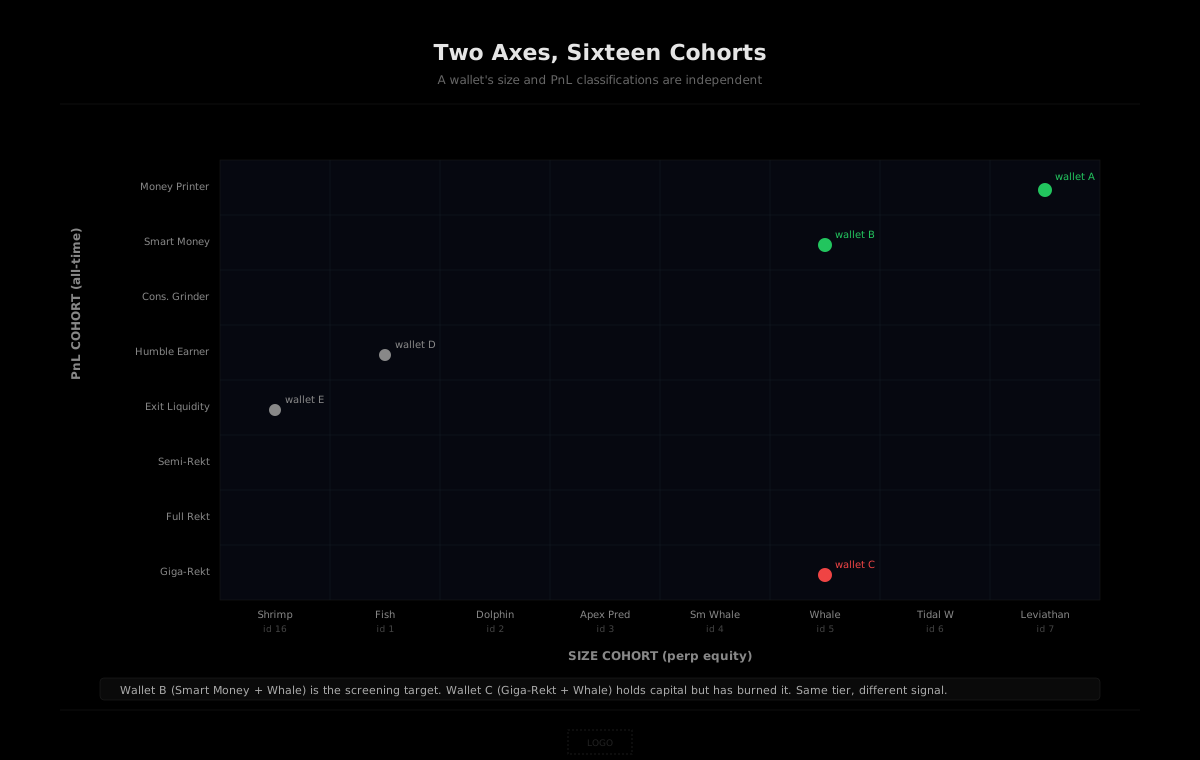
HyperTracker classifies every wallet on Hyperliquid into 16 behavioral cohorts across two independent axes. Knowing which axis a wallet falls on tells you most of what you need to know about whether to act on its activity.
The size axis is by current perp equity. Eight tiers, from Shrimp at the bottom (under $250) up to Leviathan at the top (over $5 million). This is what most people mean colloquially when they say "whale." The full ladder, with segment IDs you will use in queries:
| ID | Cohort | Perp equity | | --- | --- | --- | | 16 | Shrimp | $0 to $250 | | 1 | Fish | $250 to $10K | | 2 | Dolphin | $10K to $50K | | 3 | Apex Predator | $50K to $100K | | 4 | Small Whale | $100K to $500K | | 5 | Whale | $500K to $1M | | 6 | Tidal Whale | $1M to $5M | | 7 | Leviathan | $5M+ |
The PnL axis is by all-time realized profit and loss. This is the more interesting axis for trading signal because it captures not just how much capital a wallet has but whether they have ever shown an edge with it. A wallet can be a Whale by size and Giga-Rekt by PnL. That is a very different profile than a Whale-by-size who is also a Money Printer:
| ID | Cohort | All-time PnL | | --- | --- | --- | | 8 | Money Printer | +$1M and up | | 9 | Smart Money | +$100K to +$1M | | 10 | Consistent Grinder | +$10K to +$100K | | 11 | Humble Earner | $0 to +$10K | | 12 | Exit Liquidity | -$10K to $0 | | 13 | Semi-Rekt | -$100K to -$10K | | 14 | Full Rekt | -$1M to -$100K | | 15 | Giga-Rekt | Below -$1M |
Step 1: Pull positions and segment IDs
The base URL for HyperTracker external API calls is https://ht-api.coinmarketman.com/api/external. Auth is JWT bearer. The first call resolves an address to its current positions and the segment IDs the wallet currently belongs to.
curl -H "Authorization: Bearer $HT_TOKEN" \
  "https://ht-api.coinmarketman.com/api/external/positions?address=0x9f8a...c4e1"
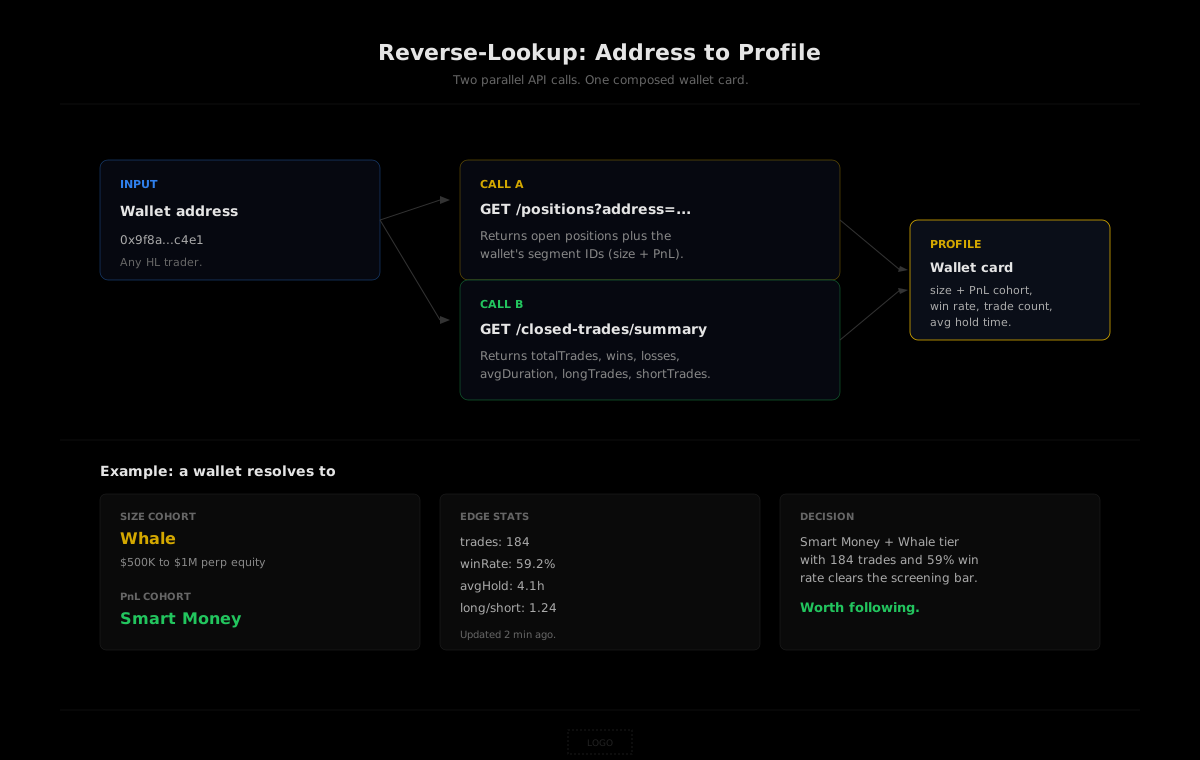
The response gives you the wallet's open positions and, more importantly for our purposes, the segment IDs the address is classified into. A wallet always has exactly two: one size segment (id 1 to 7 plus 16) and one PnL segment (id 8 to 15). Map those IDs back to the names from the table above, and you have your two cohort labels in one round trip.
One quirk worth flagging up front. The param is address, singular. The endpoint also accepts segmentId when you want to filter to a specific cohort, but for the reverse-lookup case you start from the wallet, not the cohort, so just pass the address.
Step 2: Enrich with closed-trades summary
The cohort labels tell you what tier the wallet sits in. They do not tell you whether the wallet is currently winning or losing inside that tier. For that you need the closed-trades summary endpoint, which we covered in detail in our developer's guide to closed trades.
curl -H "Authorization: Bearer $HT_TOKEN" \
  "https://ht-api.coinmarketman.com/api/external/closed-trades/summary?address=0x9f8a...c4e1"
The response gives you total trades, wins, losses, average duration, and the long/short split. From there, win rate is one division and average hold time is one unit conversion. Pair these with the cohort labels from step 1 and the wallet card writes itself.
The reason to do this in two calls instead of trying to skip one is that cohort label and recent edge can disagree. A Money Printer wallet that has gone cold for six months still shows up as Money Printer because the all-time PnL cohort is sticky. Their last 30 trades might be a 30% win rate and negative cumulative PnL. Without the summary endpoint you would not know this. With it, you do.
Step 3: Compose the wallet profile card
Stitching the two calls together gives you a function that takes an address and returns a usable profile. Here is the minimum viable version:
const SIZE_NAMES = {
  16: 'Shrimp', 1: 'Fish', 2: 'Dolphin', 3: 'Apex Predator',
  4: 'Small Whale', 5: 'Whale', 6: 'Tidal Whale', 7: 'Leviathan'
};
const PNL_NAMES = {
  8: 'Money Printer', 9: 'Smart Money', 10: 'Consistent Grinder',
  11: 'Humble Earner', 12: 'Exit Liquidity', 13: 'Semi-Rekt',
  14: 'Full Rekt', 15: 'Giga-Rekt'
};

async function walletProfile(address) {
  const headers = { Authorization: `Bearer ${process.env.HT_TOKEN}` };
  const base = 'https://ht-api.coinmarketman.com/api/external';

  const [posRes, sumRes] = await Promise.all([
    fetch(`${base}/positions?address=${address}`, { headers }),
    fetch(`${base}/closed-trades/summary?address=${address}`, { headers })
  ]);
  const pos = await posRes.json();
  const sum = await sumRes.json();

  const sizeId = pos.segmentIds?.find(id => id <= 7 || id === 16);
  const pnlId  = pos.segmentIds?.find(id => id >= 8 && id <= 15);

  return {
    address,
    sizeCohort: SIZE_NAMES[sizeId] || 'Unknown',
    pnlCohort:  PNL_NAMES[pnlId]   || 'Unknown',
    trades:     sum.totalTrades,
    winRate:    sum.totalTrades ? sum.wins / sum.totalTrades : 0,
    avgHoldHrs: sum.avgDuration / 3600,
    longShortRatio: sum.shortTrades ? sum.longTrades / sum.shortTrades : null,
    updatedAt:  sum.updatedAt
  };
}
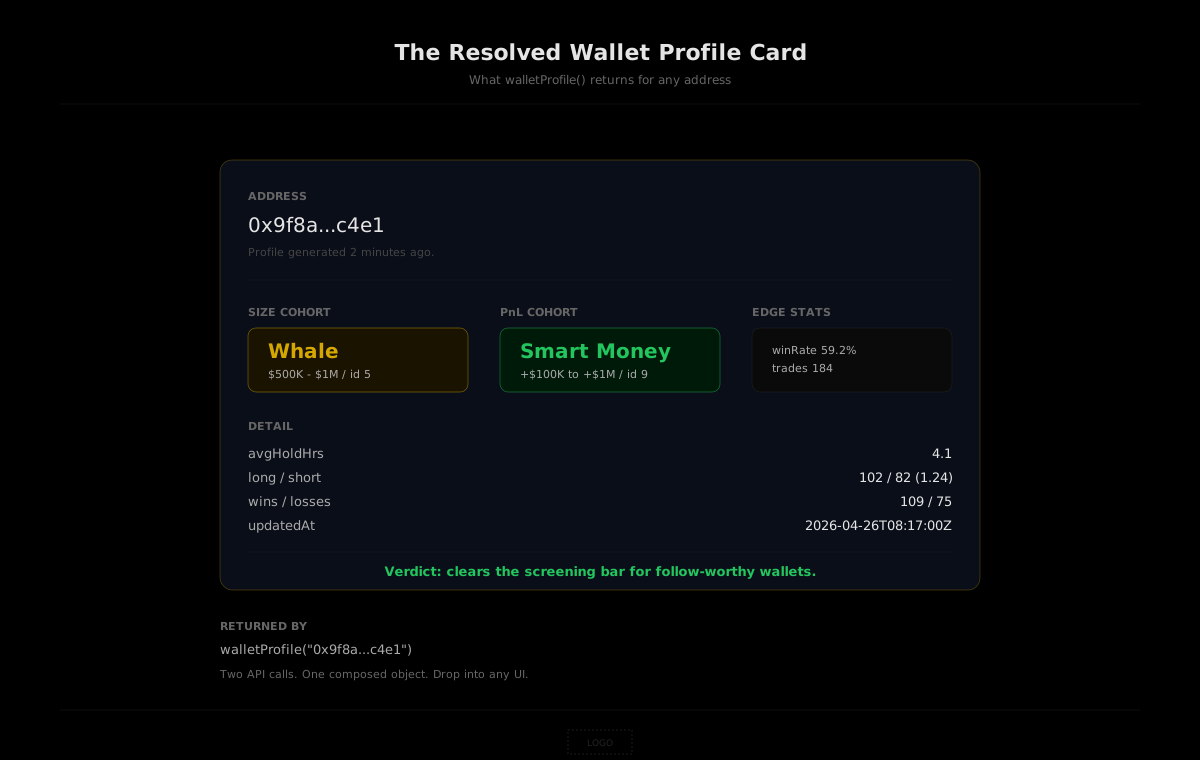
Two API calls, made in parallel, returning a complete profile card in one round trip's worth of latency. Drop this into a Discord bot, a leaderboard component, or a copy-trade screening tool, and you have a primitive that works on any address you pass it.
Production considerations
The recipe above is the happy path. Three things to handle before you ship it.
Caching
Cohort assignments do not change second-to-second. A wallet that is Whale-tier today will probably still be Whale-tier in five minutes. Our data refreshes every 5 minutes, which is also a reasonable cache TTL for the profile object. Keyed on address, with the updatedAt field from the summary response as your invalidation signal, a 60-second cache covers most read paths and saves you most of your request budget.
Wallets with no closed trades
A wallet that has positions open but has never closed a trade returns an empty summary object. Your code path needs to handle this case. The size cohort still resolves from the positions endpoint, the PnL cohort might be classified at the boundary tier, and the edge stats are simply not available yet. In a UI, render this as "new wallet" rather than showing a confusing zero-everything card.
Pagination and rate limits
If you are profiling many wallets at once (say, every wallet that interacted with a token in the last 24 hours), batch your calls and respect the rate limit on your tier. Pulse is 60 requests per minute, Surge is 100, Flow is 200. For wallet-by-wallet enrichment, that is plenty. For a one-off batch of a thousand addresses, throttle to stay under the ceiling. The nextCursor pattern on the closed-trades list endpoint matters when you want full trade history per wallet, but for the summary-only profile the response is bounded.
What you can build with this
The reverse-lookup primitive is small but it unlocks a category of features that were impractical before. Three patterns we have seen builders ship in the weeks since these endpoints went live.
Verified-edge leaderboards. Run the recipe over the top N wallets by 30-day PnL and publish the result. Each row carries the address, both cohort labels, and the win rate. Readers can see at a glance whether the leader is a Money Printer that has been compounding for years or a Humble Earner who just had a hot week.
Copy-trade pre-screening. Before mirroring any wallet, run the profile call. If the size cohort is below Apex Predator or the PnL cohort is in the negative bands, reject. If trade count is under 30, reject. The remaining universe is the set of wallets where copy-trading might actually pay off.
Profile pages and DMs. The simplest application: when a user shares a Hyperliquid address with you, surface the profile. Discord bots can do this on demand. Twitter scrapers can attach it to PnL screenshots. Internal dashboards can use it to filter incoming DM signals from random anonymous wallets versus signals from wallets with actual track record.
Build with the reverse-lookup recipe
Pulse plan ($179/mo) gets you 50,000 requests per month against the full positions and closed-trades surface, plus the rest of our 16-cohort intelligence. Free tier available for testing (100 requests per day, no credit card).
Closing the loop
Anonymous addresses on a public chain were always a fiction. The data was there, the truth was on the chain, the only thing missing was the function call that turned a hex string into a profile. Two endpoints, four lines of glue code, one cached response. The next time someone DMs you a Hyperliquid screenshot, the address is no longer the question. It is the answer.