Find Any Hyperliquid Wallet by .hl Name or Partial Address
By CMM Team - 11-Oct-2026
Find Any Hyperliquid Wallet by .hl Name or Partial Address
You saw a whale move on Hyperliquid. Maybe it was a CT screenshot, maybe a leaderboard entry, maybe a friend's Telegram message. Either way, you have a fragment: the first few characters of an address, or a .hl name you spotted in a trade notification. And now you need to find the full wallet profile, because the fragment alone tells you nothing about whether this trader is worth following or fading.
HyperTracker's wallet search handles both cases. Type a partial address and it resolves the match. Type a .hl name registered through @hlnames and it maps the human-readable label to the underlying address. Once you land on the wallet, you get the full picture: cohort classification, open positions, PnL history, and the auto-generated readable name that makes the wallet recognizable across sessions. This guide walks through how each search path works and what to look at once you find the wallet you are after.
Two ways to search: partial address and .hl name
Hyperliquid addresses are standard 42-character hex strings. Nobody remembers them. Before HyperTracker added advanced search, finding a wallet required pasting the full address exactly right, which meant having it on a clipboard or not finding it at all.
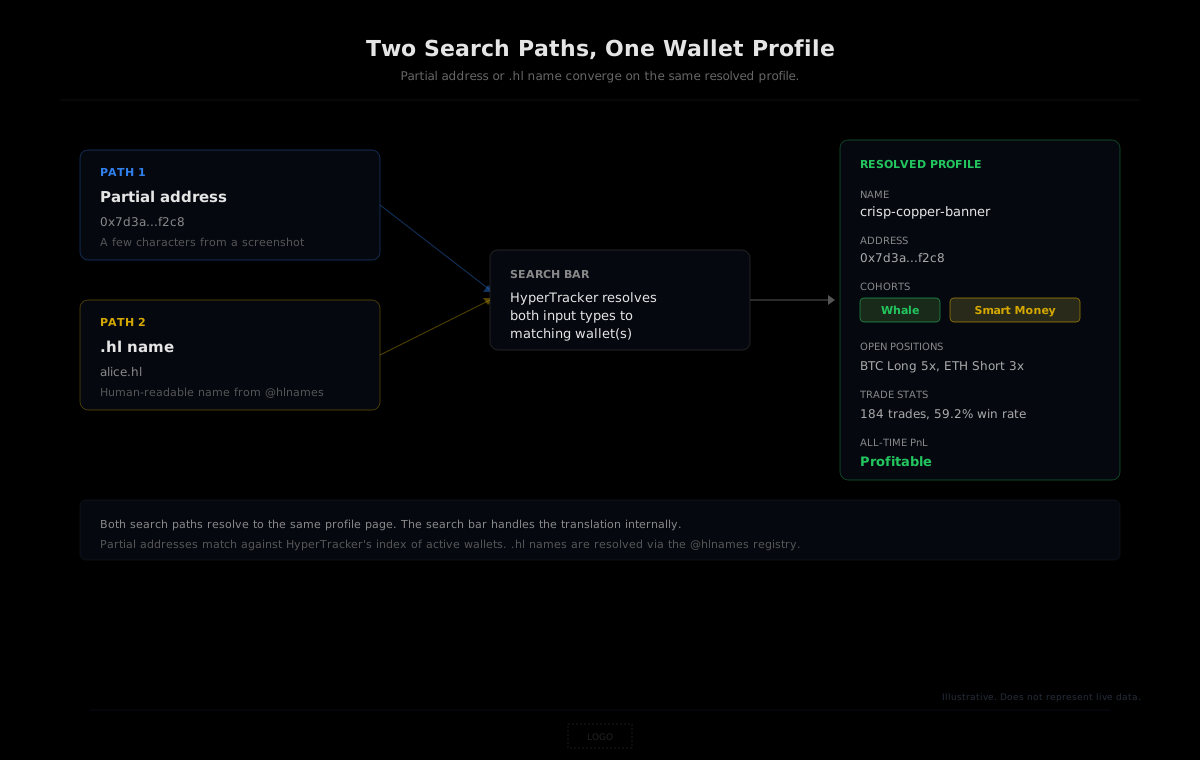
The search bar in HyperTracker now supports two input types that solve this problem.
Partial address matching
Type any substring of a wallet address into the search bar at app.coinmarketman.com/hypertracker and the search resolves to matching wallets. You do not need the full 42 characters. If someone shares a screenshot where only the first and last four characters are visible, something like 0x7d3a...f2c8, the partial match will surface the wallet as long as the substring is unique enough to narrow the results.
This works because HyperTracker indexes every active wallet on the exchange. "Active" means the wallet has had perp volume in the last 30 days or currently holds an open position. Dormant wallets that have not traded recently will not appear in the live search results, though their historical trades remain accessible through the closed-trades endpoints.
.hl name resolution
Hyperliquid's naming service, run by @hlnames, lets wallets register human-readable names like alice.hl or bigfish.hl. These names work like ENS for Ethereum: a convenient alias mapped to the underlying hex address.
HyperTracker's search bar resolves .hl names directly. Type alice.hl and the search translates the name into the wallet's address and loads its full profile. You do not need to look up the hex address separately on a block explorer or naming registry. The resolution happens inside the search itself.
This matters most when you encounter a trader by their .hl name on CT or Discord. Instead of hunting down their raw address through a chain of links, you type the name and land directly on their profile page with all the context HyperTracker computes: cohort labels, leverage, exposure, win rate, and open positions.
Auto-generated readable names
Every wallet on HyperTracker also gets an auto-generated readable name, like crisp-copper-banner or quiet-jade-falcon. These are not .hl names (those are user-claimed). They are system-assigned labels that make wallets recognizable without memorizing hex strings.
The practical value is continuity. If you are tracking a specific whale across multiple sessions, the readable name stays consistent. Instead of squinting at 0x8ef2...a1b4 and trying to remember whether that was the big ETH trader or the BTC scalper, the name crisp-copper-banner sticks in your head. When you see it again on a leaderboard or in a cohort breakdown, the recognition is immediate.
These names show up across the HyperTracker interface: in the wallet profile page, on leaderboards, and in position views. They are deterministic (the same address always gets the same name) and designed to be memorable without being meaningful, so they do not leak any information about the wallet's trading behavior.
What you see once you find a wallet
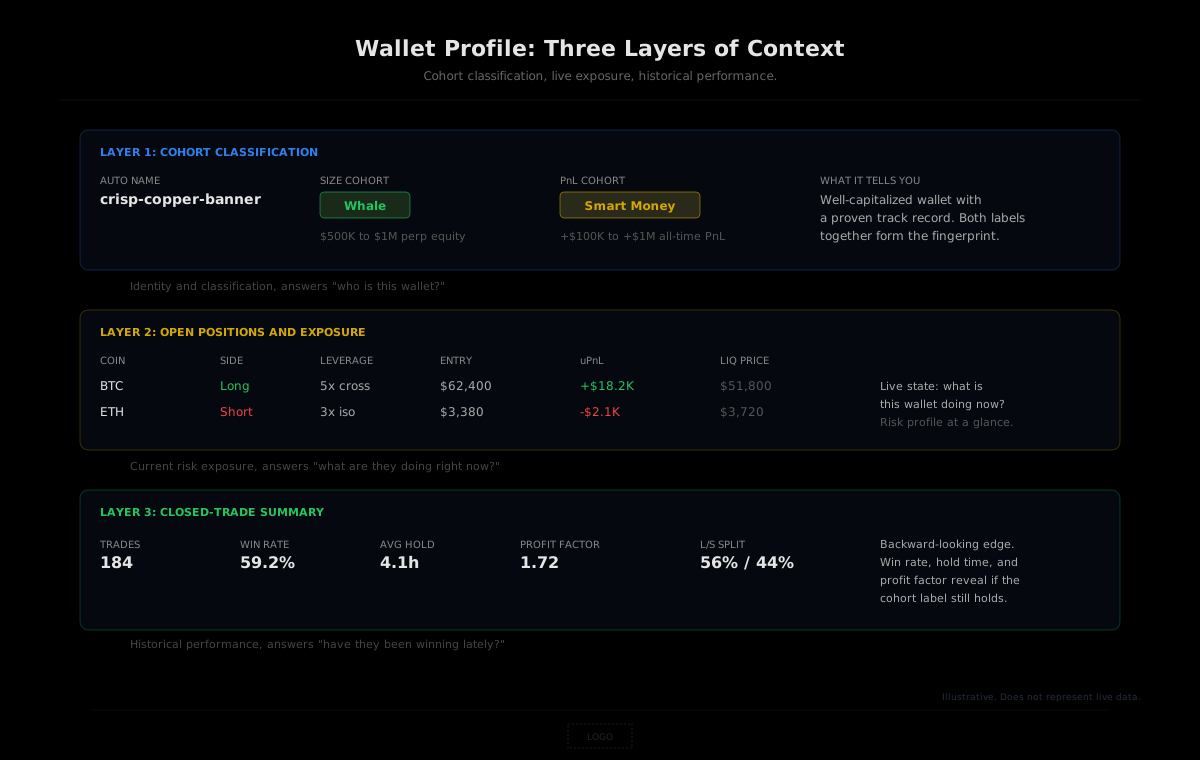
The search is just the entry point. The actual value is in what HyperTracker surfaces on the wallet's profile page once you arrive there. Three layers of information, each useful for a different purpose.
Cohort classification
Every active wallet on Hyperliquid is classified into two of HyperTracker's 16 behavioral cohorts. One axis is by perp equity (size), ranging from Shrimp under $250 to Leviathan above $5 million. The other axis is by all-time realized PnL (track record), from Money Printer at $1 million in profit all the way down to Giga-Rekt at losses exceeding $1 million.
The two labels together give you a fingerprint. A Whale by size who is also Smart Money by PnL is a different animal from a Whale who is Full Rekt. Both have capital, but only one has shown an edge over time. When you pull up a wallet through search, these two cohort badges sit at the top of the profile, and they answer the first and most important question: should you pay attention to what this wallet does next?
| Axis | Range | Cohorts | | --- | --- | --- | | Size (perp equity) | $0 to $5M+ | Shrimp, Fish, Dolphin, Apex Predator, Small Whale, Whale, Tidal Whale, Leviathan | | PnL (all-time) | Below -$1M to +$1M+ | Giga-Rekt, Full Rekt, Semi-Rekt, Exit Liquidity, Humble Earner, Consistent Grinder, Smart Money, Money Printer |
Open positions and exposure
Below the cohort labels, the profile shows the wallet's current open positions. Coin, side (long or short), entry price, mark price, unrealized PnL, leverage, and liquidation price. This is the live state of what the wallet is doing right now.
For a copy-trader screening a target, this is the section that tells you whether the wallet's current risk profile matches your own tolerance. A wallet with 20x isolated leverage on a single coin is a very different follow target than one running 3x cross-margin across four positions. The profile lays out both scenarios without you having to calculate anything.
Trade history and win rate
The wallet's closed trades give you the backward-looking picture: total trades, win rate, average hold time, the long/short split, and the profit factor across different time windows. A wallet might be a Money Printer over its lifetime but have gone cold for the last quarter. The closed-trade summary catches that divergence, which the cohort label alone does not surface because the all-time PnL cohort is sticky.
Together, these three layers, cohort context, live exposure, and historical performance, make the wallet profile page the most information-dense screen you can land on from a search query. The search gets you there. The profile tells you whether to act.
Search tips that save time
A few patterns that make wallet search faster once you know them.
Try the suffix first. Many Hyperliquid addresses share common prefixes because they were generated by the same wallet provider or deployed in sequence. If you have both the first and last few characters from a screenshot, try the last four first. The suffix tends to be more unique and narrows results faster.
Bookmark by .hl name when possible. If a trader you follow has registered a .hl name, save that name instead of the hex address. It is human-readable, easy to type from memory, and resolves instantly in the search bar. Even if the underlying address changes (rare, but theoretically possible through delegation), the .hl name follows the wallet's identity.
Check the auto-generated name for continuity. When you find a wallet through search, note its auto-generated readable name. The next time you encounter that same address on a leaderboard or in a cohort view, the name will be the same. This is especially useful when you are monitoring multiple wallets across sessions, because four or five auto-generated names are far easier to keep straight than four or five hex strings that all share the same prefix.
Inactive wallets still have history. If a search returns no results for a partial address, the wallet might be inactive (no perp volume in the last 30 days and no open positions). The live search only covers active wallets. To find an inactive wallet's trade history, you would query the closed-trades endpoint via the API using the full address. The data is still there; it just does not surface in the dashboard's live search index.
Going deeper with the API
The dashboard search is the fastest path for manual lookups. For anything programmatic, the HyperTracker API gives you the same resolution capability in code.
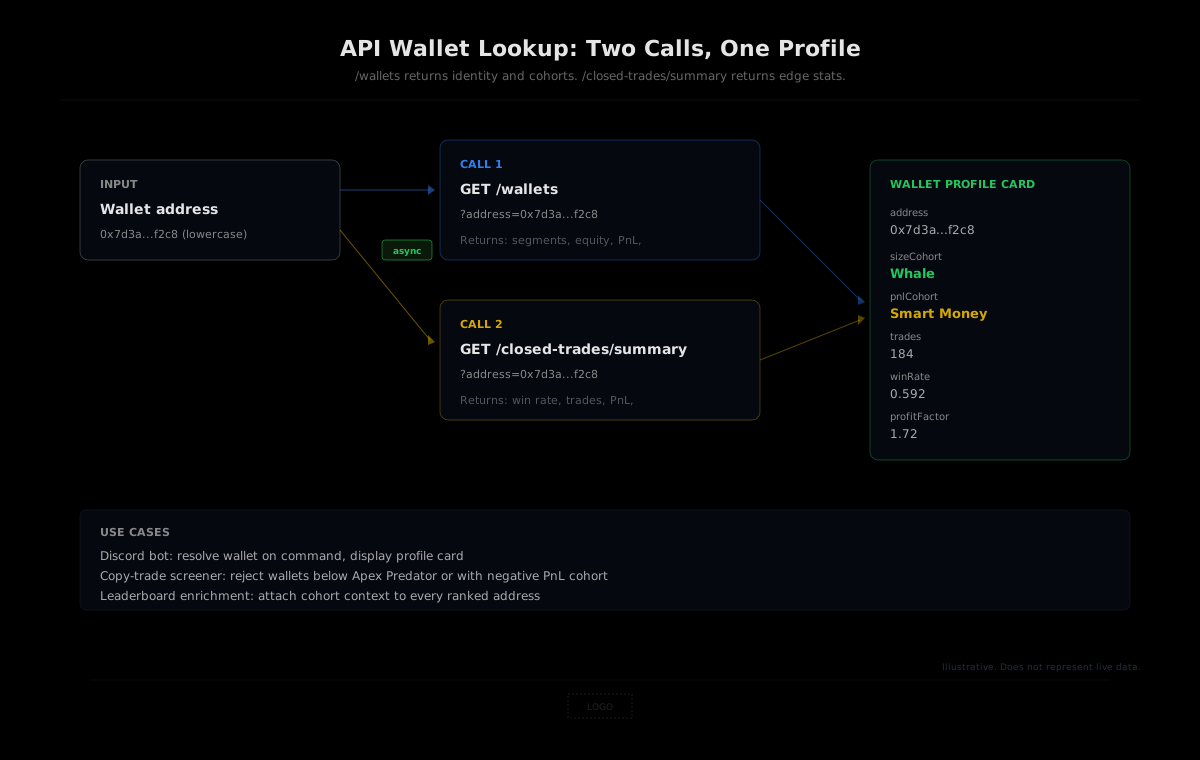
The /wallets endpoint accepts an address parameter (lowercase) and returns the wallet's full profile: equity, PnL, cohort segment IDs, closest liquidation, exposure ratio, and the display name. For a single wallet lookup, this is the equivalent of what the dashboard search surfaces visually.
curl -H "Authorization: Bearer $HT_TOKEN" \
  "https://ht-api.coinmarketman.com/api/external/wallets?address=0x7d3a...f2c8"
The response includes the segments array with two IDs: one for the size cohort and one for the PnL cohort. Map those IDs back to names (Shrimp is 16, Fish is 1, through Leviathan at 7 for size; Money Printer is 8 through Giga-Rekt at 15 for PnL), and you have the wallet's classification in a single API call.
To enrich the profile with trade history, pair it with /closed-trades/summary:
curl -H "Authorization: Bearer $HT_TOKEN" \
  "https://ht-api.coinmarketman.com/api/external/closed-trades/summary?address=0x7d3a...f2c8"
This returns win rate, profit factor, expectancy, average hold time, and the per-coin breakdown. Two API calls, made in parallel, give you the same wallet card that the dashboard renders visually.
Important: The
/walletsendpoint requires lowercase addresses. A checksummed or uppercase address returns an empty result, not an error. The/closed-trades/summaryendpoint accepts any case. When building tools that accept user-pasted addresses, lowercase the input before calling/wallets.
For builders who want to integrate wallet search into their own apps, bots, or dashboards, the API surface covers everything the dashboard shows. The search bar's .hl name resolution is a dashboard feature; the API works with raw addresses. If your users will input .hl names, you would resolve the name to an address on the client side (via the @hlnames registry) before passing it to the API.
Search any wallet on Hyperliquid
HyperTracker's wallet search resolves .hl names and partial addresses to full profiles with cohort labels, open positions, and trade history. Free to use on the dashboard. API access starts at $179/mo with the Pulse plan (100 free requests per day, no credit card required).
From fragment to fingerprint
A partial address or a .hl name is a fragment. It points at a wallet but tells you nothing about it. What makes the fragment useful is the resolution layer that sits on top of the raw chain data: the cohort classification, the trade history, the live exposure. HyperTracker turns the search into a profile, and the profile into a decision. The next time you catch a few characters of a wallet address on CT, you are one search away from knowing whether that trader has earned your attention.