
Five Numbers That Reveal a Builder's True Edge on Hyperliquid
By CMM Team - 12-Oct-2026
Five Numbers That Reveal a Builder's True Edge on Hyperliquid
A builder code on Hyperliquid is not just a referral link. It is a business relationship. Every trade a user places through a front-end that stamps a builder code generates fees for that builder, and the fee structure, user base, and revenue trajectory tell you whether the front-end is worth integrating with or building on top of. The problem is that most people never check. They pick a front-end because a friend recommended it, or because the UI looked clean, and they skip the part where the data is sitting right there in the builder's profile.
This guide walks through the five numbers you should pull from a builder profile before you integrate, partner, or route volume through a Hyperliquid front-end. All five are available through the HyperTracker API or the builder profile pages on the Builders leaderboard. The approach works whether you are a developer evaluating front-ends to build on, a fund allocating capital through specific interfaces, or a trader deciding which code to use.
Figures as of July 2026, from HyperTracker's builder leaderboard.
How builder profiles work on Hyperliquid
Every front-end that routes trades through Hyperliquid can register a builder code. When a user trades through that front-end, the builder code gets stamped on every fill, and the builder earns a fee on each trade. Hyperliquid's builder fee system is how front-ends like Phantom, Based, MetaMask, and dozens of others monetize their Hyperliquid integrations.
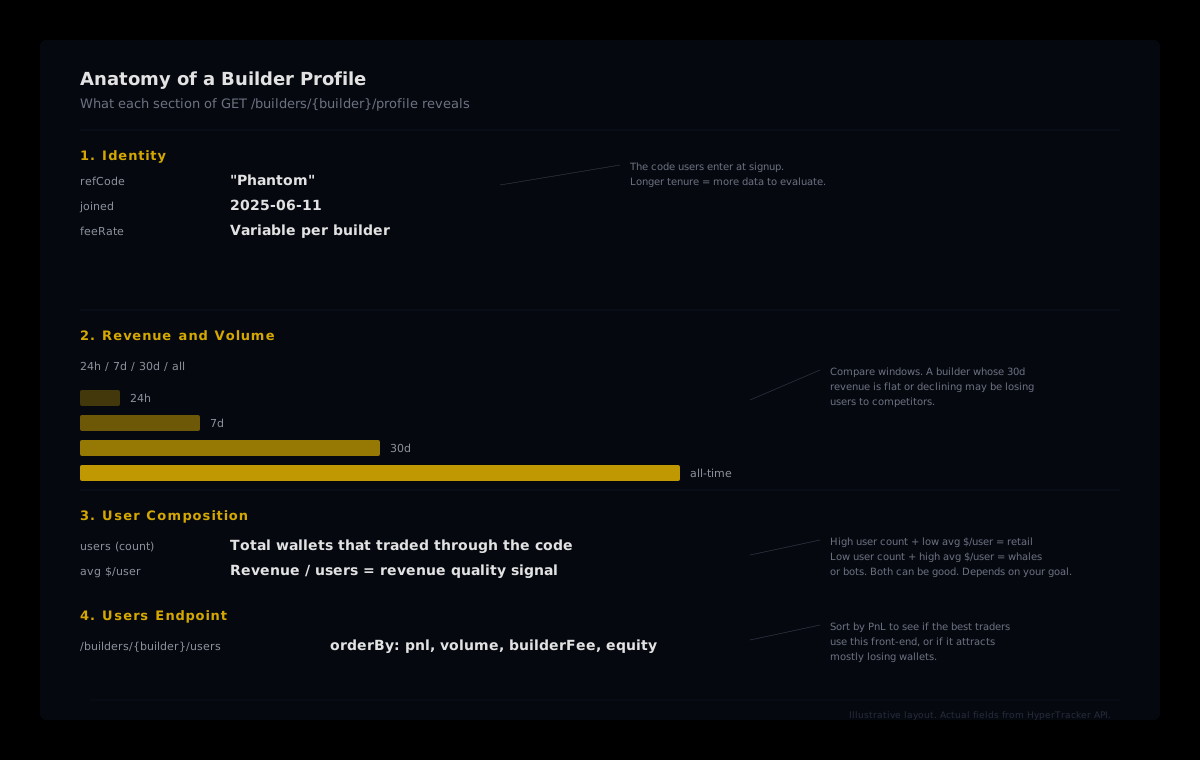
HyperTracker tracks every builder code on the exchange and computes profile-level analytics that Hyperliquid's own API does not expose. Two endpoints give you the full picture:
GET /builders/{builder}/profilereturns the builder's identity, total revenue, fee rates, and analytics broken out by time window: 24h, 7d, 30d, and all-time.GET /builders/{builder}/usersreturns the individual wallets that traded through the code, sortable by PnL, volume, builder fee paid, or equity.
The builder leaderboard at /builders/list/timeframe/{timeframe} ranks every builder by revenue and includes previous-period comparisons so you can spot trends at a glance. Between these three endpoints, you have everything you need to run due diligence on any Hyperliquid front-end.
Check 1: Revenue trend across time windows
The first thing to look at is not how much revenue a builder has earned in total but how the trajectory looks across the 7-day, 30-day, and all-time windows. A builder that earned most of its revenue in the first month after launch and has been flat since then tells a different story than one whose 30-day revenue is its strongest period yet.
The profile endpoint returns revenue for 24h, 7d, 30d, and all-time. Calculate the ratios. If 30-day revenue is a meaningful fraction of all-time revenue for a builder that has been active for several months, the front-end is growing. If 30-day revenue is a tiny sliver, it may have peaked.
This matters because builder codes are sticky for users but not permanent. A front-end that stops improving its UX or adding features will lose traders to competitors. You can see this in the data before it shows up in anyone's announcement thread.
What to compute: 30-day revenue as a percentage of all-time revenue. Compare this to how long the builder has been active (the
joineddate is in the profile). A builder active for 12 months whose last 30 days account for a declining share of total revenue is trending down.
Check 2: User count trajectory
Revenue can grow because existing users trade more, or because new users arrive. The user count across time windows helps you separate the two. A builder whose total user count is growing but whose 30-day active users are declining is coasting on a shrinking base of heavy traders. That is fragile.
The profile endpoint returns user counts for each window. The all-time user count on the leaderboard snapshot shows how many wallets have ever traded through the code. Among the top builders as of July 2026, the range is enormous. Phantom had over 153,000 users, while Insilico had about 3,300. Both are in the top five by revenue. The user base composition matters more than the raw count.
If you are evaluating a builder for a partnership (say, co-marketing or data integration), you want to know whether its user growth is organic and ongoing or a one-time spike from a launch campaign. The time-windowed data makes this visible without requiring you to track it over weeks.
Check 3: Revenue per user
This is the number that tells you the most about what kind of users a front-end attracts. Revenue divided by user count gives you the average fee generated per wallet across the builder's lifetime. And the variance across the Hyperliquid builder ecosystem is striking.
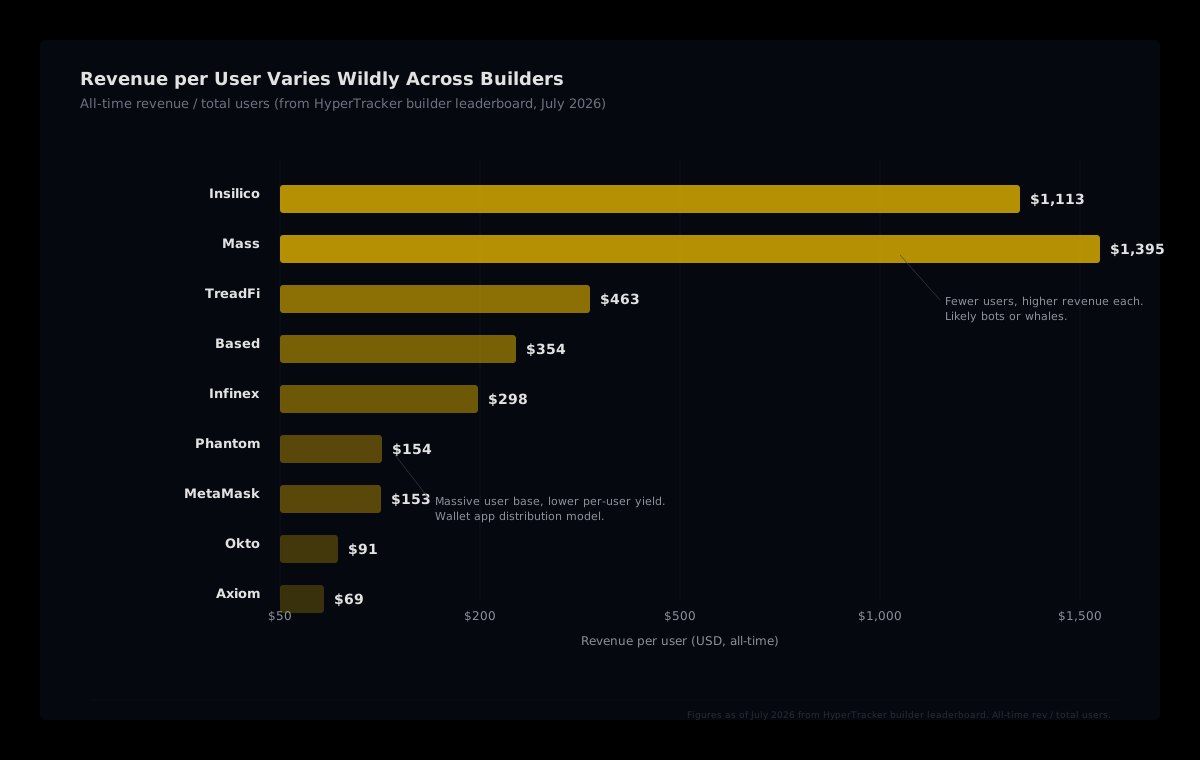
From the all-time builder leaderboard: Insilico's revenue per user works out to roughly $1,113 (about $3.7 million in total revenue across roughly 3,300 users). Phantom's is about $154 ($23.6 million across over 153,000 users). Both are top-five builders by total revenue, but they serve fundamentally different user bases.
A high revenue-per-user figure usually means the front-end attracts fewer but heavier traders: market-making bots, quant funds, or high-frequency strategies. A low revenue-per-user figure means mass distribution, typically a wallet app or a consumer-facing interface.
Neither is inherently better. But if you are building a tool that targets institutional or algorithmic users, you want to integrate with (or build on) front-ends whose user base matches. And if your product is retail-facing, a builder with 150,000+ retail wallets is a more relevant distribution channel than one with 3,000 bots.
Why 30-day revenue per user matters more than all-time
The all-time figure smooths over changes. If a builder's earliest users were whales and its recent users are retail, the all-time average masks the shift. Pull the same calculation for the 30-day window from the profile data, and you see the current state. The topic brief for this article noted that 30-day revenue per user as of mid-October 2026 varied widely even among well-known builders: some wallet-based front-ends ran in the hundreds, while others sat in the tens. The spread is informative.
Check 4: User PnL distribution
This is where the /builders/{builder}/users endpoint earns its keep. Sort by PnL (descending) and look at the top users. Are the most active wallets profitable or underwater?
GET /builders/{builder}/users?orderBy=pnl&order=desc&period=30d&limit=25
A front-end whose top 25 users by PnL are mostly profitable tells you that the interface (or the community around it) attracts wallets that know how to trade. A front-end whose top users are heavily negative tells you something different: the user base may be churning, or the audience skews toward new traders who generate fees on the way down.
This check is especially useful when evaluating a builder for copy-trading or signal integration. If you are building a product that lets users follow trades from wallets on a specific front-end, the PnL distribution of that front-end's users is your signal quality ceiling. A builder with a cluster of profitable Smart Money and Money Printer wallets is a better hunting ground for copy-trade targets than one where most users sit in the Exit Liquidity or Semi-Rekt cohorts.
You can also sort by equity to see the size distribution. A front-end where the top wallets by equity are Leviathans and Tidal Whales signals institutional-grade flow. One where the top wallets are Dolphins and Fish is a retail play. Again, neither is wrong, but the mismatch between what you are building and who the builder's users actually are is the risk.
Check 5: Volume concentration
The last check is about fragility. Sort the users endpoint by volume:
GET /builders/{builder}/users?orderBy=volume&order=desc&period=all&limit=25
If the top three wallets account for a huge share of the builder's total volume, that builder's revenue depends on a handful of relationships. Lose one whale, and the numbers drop visibly. If volume is spread across hundreds or thousands of wallets, the business is more resilient.
This is particularly important for builders considering partnerships or integrations. A builder whose revenue is concentrated in three bot wallets has a different risk profile than one where no single wallet contributes more than a small percentage of total volume. Both can generate the same total revenue, but the concentrated model is one API key rotation away from a sharp drop.
You can approximate concentration from the leaderboard data too. Compare a builder's total volume to its user count. Insilico, for example, generated roughly $36.3 billion in all-time volume across about 3,300 users. That is about $10.9 million per user on average, which strongly suggests a small number of very heavy traders. Compare that to Phantom's roughly $44.8 billion across 153,000+ users, where the average is about $293,000 per user. Volume is far more distributed.
Putting it together: a practical workflow
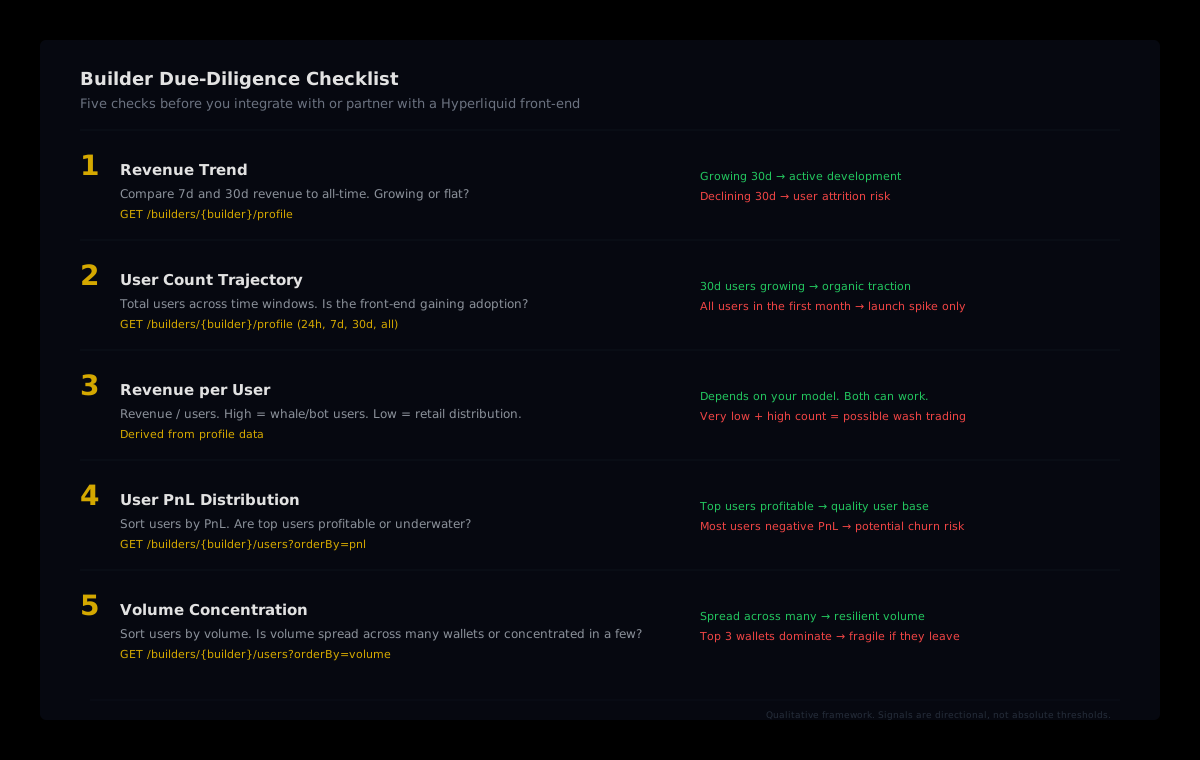
Here is the sequence in three API calls:
- Pull the profile:
GET /builders/{builder}/profile. Extract revenue and user counts for each time window. Compute revenue trend (30d as a share of all-time) and revenue per user (30d and all-time). - Sort users by PnL:
GET /builders/{builder}/users?orderBy=pnl&order=desc&period=30d. Scan the top 25. Are they profitable? What cohorts do they belong to? - Sort users by volume:
GET /builders/{builder}/users?orderBy=volume&order=desc&period=all. Check concentration. Is volume spread or dominated by a few wallets?
Three calls, five numbers: revenue trend, user trajectory, revenue per user, PnL distribution, and volume concentration. You can run this in a script, or you can eyeball it on the Builders page in the HyperTracker dashboard by clicking through to any builder's profile.
The dashboard surfaces the same data visually: the profile page shows revenue and user analytics across all four time windows, and the "Profile" link on each row of the leaderboard opens the detail view. For programmatic access, the API endpoints return the raw numbers you need for your own scoring model.
When to walk away
No single number is a dealbreaker on its own. But combinations should give you pause.
- Declining 30d revenue + declining user count: The front-end is losing both users and activity. Unless there is a clear turnaround plan (a new feature launch, a protocol upgrade, a marketing push you can verify), this is a builder in decline.
- High total revenue + very low 30d revenue: The builder made its money early and has not sustained it. Could be a one-time integration spike that was never followed up.
- Most users in negative PnL cohorts: If the majority of a builder's active users are Exit Liquidity or Semi-Rekt wallets, the user base is generating fees on the way to zero. That fee revenue has a shelf life.
- Extreme volume concentration in two or three wallets: Revenue that depends on three market-making bots is revenue that disappears if those bots migrate to a cheaper fee tier or a competitor.
These are heuristics, and every builder is different. But the point of running this check is to replace a gut feeling with data. The profiles exist. The API exists. Use them.
Run your own builder due diligence
The HyperTracker Builders page shows revenue, user counts, and per-user analytics for every builder code on Hyperliquid. Click into any profile for the full breakdown, or use the API to pull the numbers programmatically.
Explore the Builders leaderboard
Builder codes on Hyperliquid are transparent by design. The data is on-chain, and HyperTracker computes the analytics layer that turns raw fills into actionable profiles. The five checks in this guide take less time than reading a whitepaper, and they tell you more about a front-end's real traction than any pitch deck ever will.