How to Build a Hyperliquid Trading Dashboard in Python
By CMM Team - 17-Apr-2026
How to Build a Hyperliquid Trading Dashboard in Python
Most traders stare at three browser tabs at once: the exchange, a charting app, and a spreadsheet. The information they need exists across all three but never in the same place at the same time. The alternative is building a dashboard that pulls the data you actually care about into one view, updates on a schedule, and stays out of your way when there is nothing to see.
On Hyperliquid, every piece of data you need for a trading dashboard is onchain and queryable through a single API. Cohort positioning, liquidation risk, order flow snapshots, and leaderboard rankings, all in one call each. This tutorial builds a working dashboard from scratch in under 100 lines of Python.
This guide walks through the architecture, the four API calls that power it, the Python code, how to add alerts that ping you when something changes, and how to extend it from a local script into something you can leave running on a server. By the end you will have a working dashboard that shows you more about the market than any single tab ever could.
What the dashboard shows
A useful trading dashboard answers four questions on every refresh:
-
Who is positioned and which way? Cohort-level positioning for BTC and ETH: what percentage of the Money Printer cohort is long vs short, and how does that compare to the Giga-Rekt cohort. The divergence between these two is the single best positioning signal the API produces.
-
Where is the leverage clustered? The liquidation risk score for each asset. A high score means leveraged positions are stacked near current price and a cascade is one bad candle away. A low score means the leverage is spread out and there is no obvious trigger.
-
What are the resting orders doing? The latest 5-minute order flow snapshot showing where stops, take profits, and limit orders are concentrated. This tells you what happens if price reaches specific levels.
-
Who is winning today? The leaderboard, filtered by daily PnL, showing which wallets are on the right side of the market right now. Not for copy trading (see our copy trading guide for why single-wallet following is risky), but for context on who is driving the day's flow.
Four questions, four API calls, one screen. That is the dashboard.
The architecture
The dashboard is a Python script that runs in a terminal. No web framework, no frontend, no database. It fetches data from four HyperTracker endpoints, formats the results, prints them to the console, and sleeps for 5 minutes before refreshing. Total dependencies: the requests library and Python 3.
If you want to extend it later with a web UI, you can wrap the same data-fetching functions in a Flask or FastAPI app. If you want persistent storage, write each refresh to a JSON file or SQLite database. But start with the terminal version. It is faster to build, easier to debug, and just as useful for the actual trading read.
The four endpoints:
/cohort/metrics?coin=BTCreturns aggregate long/short exposure for all 16 cohorts/liquidation-risk?coin=BTCreturns the asset-level liquidation exposure score/orders/5m-snapshots?coin=BTCreturns the latest 5-minute window of resting orders/leaderboards/perp-pnl?timeframe=day&limit=5returns the top 5 wallets by daily PnL
Each call returns JSON. The free tier allows 100 requests per day, which is enough to refresh a two-asset dashboard (BTC + ETH) every 15 minutes for the full trading day with headroom to spare.
The code
Here is the full dashboard script. Copy it, drop in your JWT token, and run it.
import requests
import time
from datetime import datetime

API_BASE = "https://ht-api.coinmarketman.com/api/external"
TOKEN = "YOUR_JWT_TOKEN"
HEADERS = {"Authorization": f"Bearer {TOKEN}"}
COINS = ["BTC", "ETH"]
REFRESH_INTERVAL = 300  # 5 minutes


def fetch_cohort_divergence(coin):
    """Compare Money Printer vs Giga-Rekt positioning."""
    resp = requests.get(
        f"{API_BASE}/cohort/metrics",
        headers=HEADERS,
        params={"coin": coin},
    ).json()

    mp = next((c for c in resp if c["segmentId"] == 8), None)
    gr = next((c for c in resp if c["segmentId"] == 15), None)

    if not mp or not gr:
        return None

    mp_long = mp["longNotional"] / mp["totalNotional"]
    gr_long = gr["longNotional"] / gr["totalNotional"]
    divergence = mp_long - gr_long

    return {
        "money_printer_long": mp_long,
        "giga_rekt_long": gr_long,
        "divergence": divergence,
    }


def fetch_liquidation_risk(coin):
    """Get the liquidation exposure score."""
    resp = requests.get(
        f"{API_BASE}/liquidation-risk",
        headers=HEADERS,
        params={"coin": coin},
    ).json()
    return resp.get("riskScore", 0)


def fetch_order_flow(coin):
    """Get the latest 5-minute order snapshot summary."""
    resp = requests.get(
        f"{API_BASE}/orders/5m-snapshots",
        headers=HEADERS,
        params={"coin": coin},
    ).json()
    return resp


def fetch_leaderboard():
    """Get top 5 wallets by daily PnL."""
    resp = requests.get(
        f"{API_BASE}/leaderboards/perp-pnl",
        headers=HEADERS,
        params={"timeframe": "day", "limit": 5},
    ).json()
    return resp


def print_dashboard(data):
    """Format and print the dashboard to the terminal."""
    print("\033[2J\033[H")  # Clear screen
    print(f"{'='*60}")
    print(f"  HYPERTRACKER DASHBOARD  |  {datetime.utcnow().strftime('%H:%M UTC')}")
    print(f"{'='*60}\n")

    for coin in COINS:
        cd = data[coin]["cohort"]
        lr = data[coin]["liq_risk"]

        print(f"  {coin}")
        print(f"  {'─'*40}")

        if cd:
            mp_pct = f"{cd['money_printer_long']:.0%}"
            gr_pct = f"{cd['giga_rekt_long']:.0%}"
            div_val = cd["divergence"]
            div_label = "BULLISH" if div_val > 0.2 else "BEARISH" if div_val < -0.2 else "NEUTRAL"
            print(f"  Money Printer: {mp_pct:>6} long")
            print(f"  Giga-Rekt:     {gr_pct:>6} long")
            print(f"  Divergence:    {div_val:>+.0%} ({div_label})")
        else:
            print("  Cohort data unavailable")

        print(f"  Liq Risk:      {lr}/100")
        print()

    # Leaderboard
    lb = data.get("leaderboard", [])
    if lb:
        print(f"  TOP 5 TODAY (by daily PnL)")
        print(f"  {'─'*40}")
        for i, trader in enumerate(lb[:5], 1):
            addr = trader.get("address", "?")[:10] + "..."
            pnl = trader.get("pnlDay", 0)
            print(f"  {i}. {addr}  ${pnl:>12,.0f}")
        print()

    print(f"  Next refresh in {REFRESH_INTERVAL // 60} min")
    print(f"{'='*60}")


def run():
    """Main loop: fetch, display, sleep, repeat."""
    print("Starting dashboard... (Ctrl+C to stop)\n")
    while True:
        data = {}
        for coin in COINS:
            data[coin] = {
                "cohort": fetch_cohort_divergence(coin),
                "liq_risk": fetch_liquidation_risk(coin),
            }
        data["leaderboard"] = fetch_leaderboard()

        print_dashboard(data)
        time.sleep(REFRESH_INTERVAL)


if __name__ == "__main__":
    run()
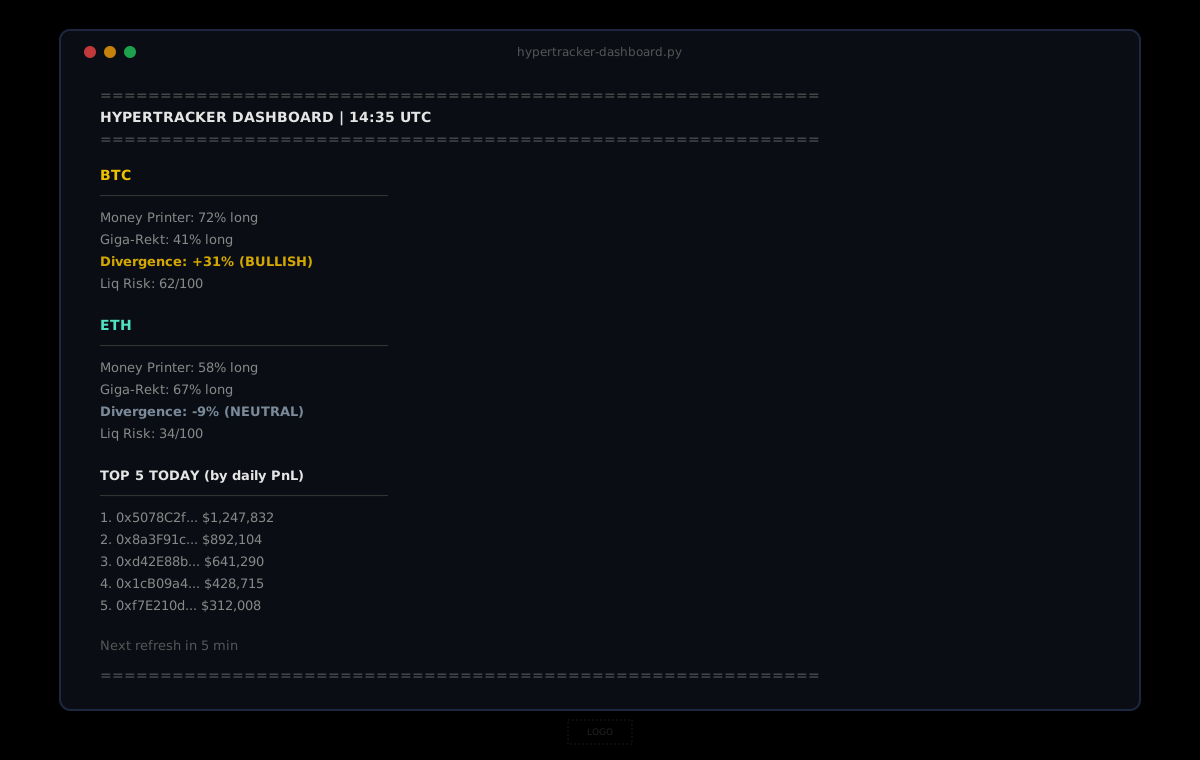
That is under 100 lines of logic. Four API calls per refresh, two assets, one leaderboard pull. The console clears and reprints every 5 minutes so you always see the latest state without scrolling.
Adding alerts
A dashboard that only displays data is useful. A dashboard that pings you when something changes is powerful. Here is how to add a simple alert layer.
The three conditions worth alerting on:
Cohort divergence flip. If the Money Printer / Giga-Rekt divergence crosses the 0.20 threshold (in either direction), the market regime just changed. Print a highlighted alert or send a notification.
# Add to the main loop, after fetching cohort data:
prev_divergence = {}

for coin in COINS:
    cd = data[coin]["cohort"]
    if cd and coin in prev_divergence:
        old = prev_divergence[coin]
        new = cd["divergence"]
        if abs(old) < 0.2 <= abs(new):
            print(f"  *** ALERT: {coin} divergence crossed 0.20 ({new:+.0%}) ***")
    if cd:
        prev_divergence[coin] = cd["divergence"]
Liquidation risk spike. If the risk score jumps above 70 on any asset, a cascade is nearby. This is the "pay attention" signal.
Leaderboard churn. If the top 5 wallets change significantly between refreshes (new addresses appearing, large PnL swings), the market is rotating. Track the previous leaderboard and compare.
For push notifications, pipe the alert message through a Telegram bot, a Slack webhook, or a simple email via SMTP. The data layer is the same. The delivery is one requests.post() to whichever channel you use.
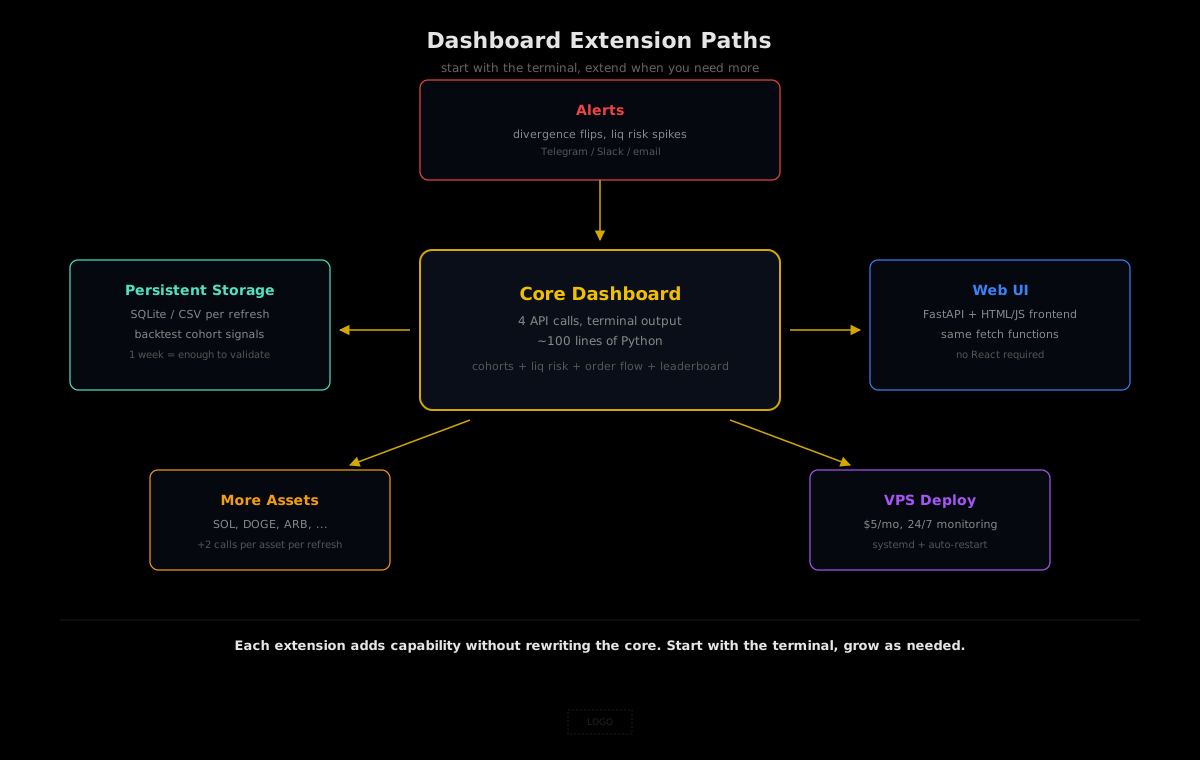
Extending the dashboard
Once the basic version is running, there are a few natural extensions.
Add more assets. Append to the COINS list. Each additional asset costs 2 API calls per refresh (cohort + liquidation risk). With the free tier's 100 daily requests and a 15-minute refresh interval, you can comfortably track 4 assets.
Add cohort bias history. Query /segments/{segmentId}/bias-history for each cohort to see not just the current positioning but the 12-hour trend. A divergence that has been building for 6 hours is a much stronger signal than one that appeared on the last refresh.
Add a web UI. Wrap the fetch functions in a FastAPI app, serve the data as JSON endpoints, and build a simple HTML/JS frontend that polls every 5 minutes. The entire frontend can be a single HTML file with a few fetch() calls and some styled <div>s. No React required.
Write to a database. Append each refresh to a SQLite database or a CSV file. After a week of data, you can run backtests against cohort positioning changes and validate whether the divergence signal would have been profitable in your timeframe.
Deploy to a server. A $5/month VPS (DigitalOcean, Hetzner, Railway) can run this script 24/7. Add a systemd service file, set it to restart on failure, and you have a persistent market monitor that never sleeps.
What you will learn from running it
The dashboard is useful on day one because it puts cohort positioning, liquidation risk, and leaderboard context in one place. But the real value comes from watching it over a week. You start to notice patterns: the Money Printer cohort goes quiet before big moves. The liquidation risk score climbs steadily for two days before a cascade. The leaderboard turns over completely after a trend reversal.
These patterns are not visible on a price chart. They are not visible in aggregate open interest. They are only visible when you stratify the data by who is positioned and watch the segments move against each other over time. That is what the dashboard gives you that no single tab ever will.
The free tier on HyperTracker gives you 100 requests per day: enough to run a 2-asset dashboard on a 15-minute refresh cycle for the full trading day. No credit card, no trial period, no feature gates on the data itself.
Closing thoughts
A trading dashboard is not a product. It is a lens. The same data that powers Market Radar, the same cohort metrics that drive divergence signals, the same liquidation risk scores that warn of cascades: all of it is available through the same API, and a hundred lines of Python is enough to turn it into something you can glance at between trades and immediately know whether the market has shifted since the last time you looked.
The traders with the best reads are not the ones with the most screens. They are the ones whose screens show the data that matters, updated before the chart confirms it.