Liquidity Clusters on Hyperliquid: How to Read Where the Market Will Move Next
By CMM Team - 15-Apr-2026
Liquidity Clusters on Hyperliquid: How to Read Where the Market Will Move Next
Thousands of traders on Hyperliquid have a stop loss sitting at a specific price right now. A take profit at another. A limit order waiting to fill at a third. Individually those orders are invisible noise. Stack a few thousand of them at the same price level and they become gravity. Price does not drift through a cluster of resting liquidity gently. It accelerates into it, clears it, and snaps back. The traders who know where those clusters are before price arrives have a structural advantage over the traders who find out when their own stop gets hit.
Market Radar maps every liquidation level, stop loss, take profit, and limit order across hundreds of thousands of wallets on Hyperliquid, then shows you the highest-density zones above and below current price. Broken down by cohort, so you can see whose stops are about to get run.
This guide covers what liquidity clusters are and why they move price, how to read each of the four types (liquidations, stops, take profits, limit orders), why the cohort breakdown changes the entire read, and how to use Market Radar on HyperTracker to find the levels that actually matter before the chart gets there.
What are liquidity clusters and why do they move price?
A liquidity cluster is a price level where a disproportionate number of resting orders are stacked. These are not active market orders pushing price around. They are passive orders waiting at specific prices: stop losses that will fire market orders in the direction of the move when breached, take profits that will fire counter-directional exits when reached, liquidation thresholds that will force-close positions, and limit orders that will provide or absorb liquidity at a level.
The reason clusters move price is mechanical. When price reaches a stop loss cluster, every stop in the cluster fires simultaneously. A hundred stops at the same level become a hundred market orders hitting the book in the same second. That burst of one-sided flow overwhelms whatever resting liquidity is on the other side, pushes price through the level, and often triggers the next cluster below. The same dynamic works in reverse for take profit clusters (selling into strength) and liquidation clusters (forced closes cascading into more forced closes).
The practical read is always the same: find the nearest cluster in the direction price is moving. That is where the next acceleration happens. A thin zone between here and the cluster means price will move through it quickly. A thick cluster means price will hit a wall of liquidity (limit orders providing supply or demand) and the direction may stall or reverse.
The four types of clustered levels
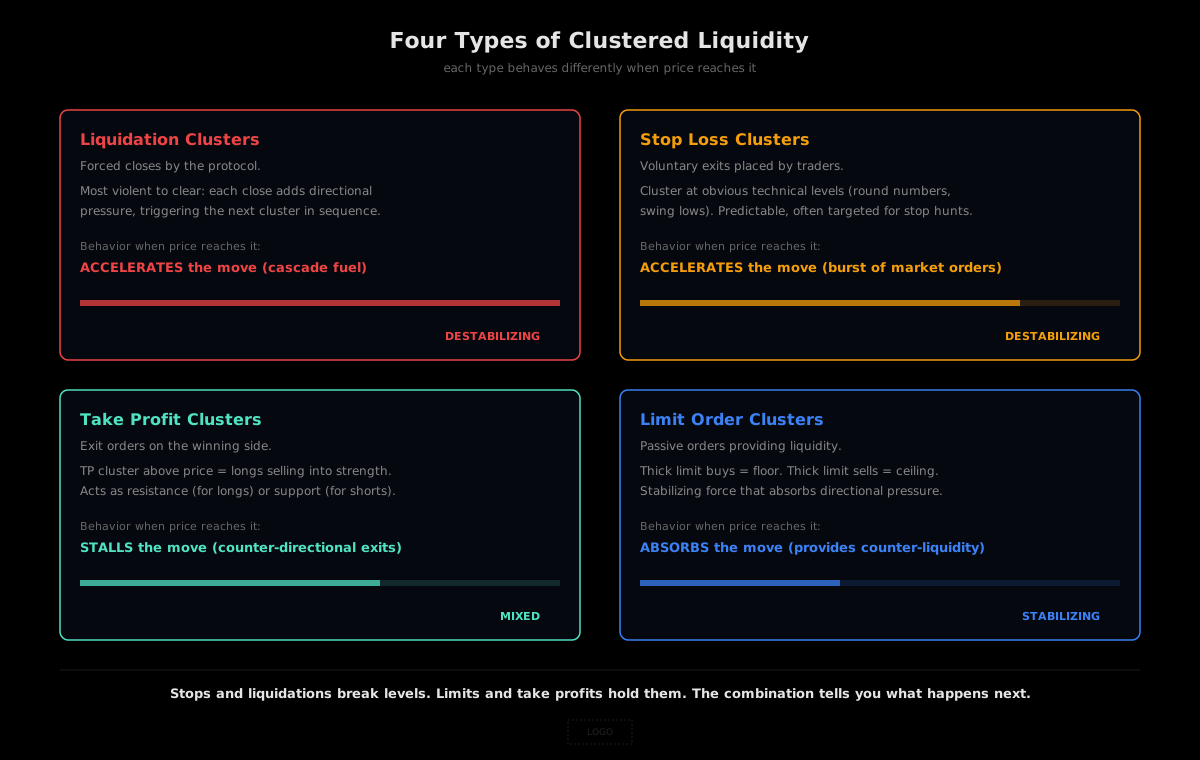
Market Radar on HyperTracker surfaces four distinct types of resting liquidity. Each one behaves differently when price reaches it, and knowing which type is clustered at a level changes how you trade around it.
Liquidation clusters. These are the price levels where leveraged positions will be force-closed by the protocol. Liquidation clusters are the most violent to clear because the forced close adds directional pressure that pushes price further into the next cluster. When you see a thick liquidation cluster below current price, you are looking at a cascade trigger: if price reaches it, the forced selling will accelerate the move. Liquidation clusters above price work the same way for shorts. (For a deep dive on the cascade mechanics, see Hyperliquid Liquidations Explained.)
Stop loss clusters. Stops are voluntary exit orders placed by traders to limit downside. When a stop cluster fires, it produces a burst of market orders in the same direction as the move. Stop clusters below price are sell-side fuel (longs exiting). Stop clusters above price are buy-side fuel (shorts covering). The key difference from liquidations: stops are chosen by the trader, which means they tend to cluster at obvious technical levels (round numbers, recent swing lows/highs, moving average intersections). This makes stop clusters more predictable in location and more likely to be targeted by aggressive players who want to trigger them for the liquidity.
Take profit clusters. TPs are exit orders placed on the winning side of a trade. A TP cluster above price means a lot of longs plan to sell at that level. A TP cluster below price means a lot of shorts plan to buy there. TP clusters act as resistance (for longs) or support (for shorts) because they inject counter-directional flow when price reaches them. The practical read: if a thick TP cluster sits just above current price, expect the rally to stall there as profitable longs cash out.
Limit order clusters. Limits are passive orders that provide liquidity. A thick limit buy cluster below price acts as a floor: if price reaches it, the resting bids will absorb the selling and slow the move. A thick limit sell cluster above price acts as a ceiling. Limit clusters are the stabilizing force in the market, in contrast to stops and liquidations which are the destabilizing force. When you see a level with thick limit orders and no stops or liquidations, that level is likely to hold. When you see a level with thick stops and liquidations and no limits, that level is likely to break.
Why the cohort breakdown changes the read
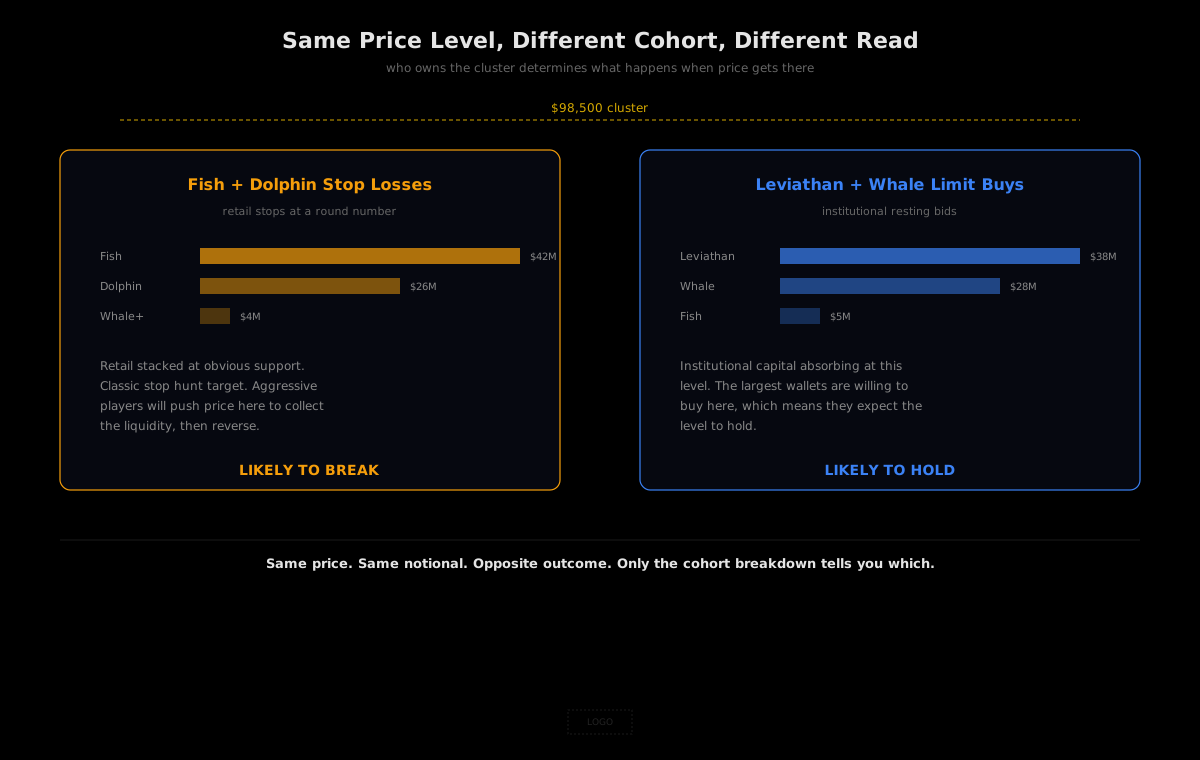
A liquidity cluster at $98,000 on BTC means one thing if it is composed of Fish and Dolphin stops, and something completely different if it is composed of Leviathan and Whale limits. The price level is the same. The market behavior when price reaches it is not.
Market Radar breaks down every liquidity zone by trader cohort. The table below the heatmap shows, for each cohort: the number of positions, average age, average long and short entry prices, peak long liquidation level and distance from current price, and peak short liquidation level and distance. This means you can answer questions like:
- Are the Leviathans positioned defensively or aggressively? If their peak long liquidation is 8% below price, they are running conservative leverage. If it is 2% below, they are leveraged to the teeth and the cluster is a cascade trigger.
- How close are the retail cohorts to liquidation? If Fish and Dolphin peak liquidation levels sit just 1% to 2% below price, a large chunk of retail leverage is on the edge. That cluster is a cascade trigger, and the heatmap will show it as a high-density zone waiting to fire.
- Are the Smart Money take profits above the retail stop losses below? If yes, the profitable cohort is planning to exit at a level that the losing cohort is betting price will never reach. One side is right and the other is funding the trade.
Without the cohort breakdown, a liquidity heatmap is a density map. With the cohort breakdown, it is a map of who is vulnerable at which price and what happens when their level gets hit.
How to read Market Radar
Market Radar is live on HyperTracker at app.coinmarketman.com/hypertracker/market-radar. Here is how to read it.
The heatmap. The main chart overlays colored liquidity zones on a price-time chart with 5-minute candles. Brighter/denser zones represent higher concentration of resting liquidity. The zones refresh every few minutes from live position and order state across all wallets. You can toggle between four views using the tabs at the top: Liquidation, Stop Loss, Take Profit, and Limit Order. Each view shows only that type of clustered liquidity so you can isolate the signal you care about.
The live liquidity sidebar. On the right side, Market Radar shows the three highest-density zones above and below current price with their dollar-denominated values. This is the quick read: where is the nearest thick cluster, how much notional is stacked there, and how far is it from current price? If the nearest cluster below is $1.34 million at 1.2% away, that is close enough to be reached on a normal intraday move and thick enough to produce visible market impact.
The stats bar. Below the chart, four numbers give you the market context: total positions open, aggregate open interest, average position age, and the total notional currently underwater. The underwater figure is especially useful: a large underwater amount combined with a nearby liquidation cluster means the cascade fuel is already soaking and just needs a spark.
The cohort table. Below the stats, a table breaks every cohort's positioning down by: number of positions, average position age, average long and short entry prices, peak long and short liquidation levels, and their distance from current price. Filter by "opened in the last 24h" to see fresh positioning, or look at all open positions for the full picture.
Practical reads: three setups to watch for
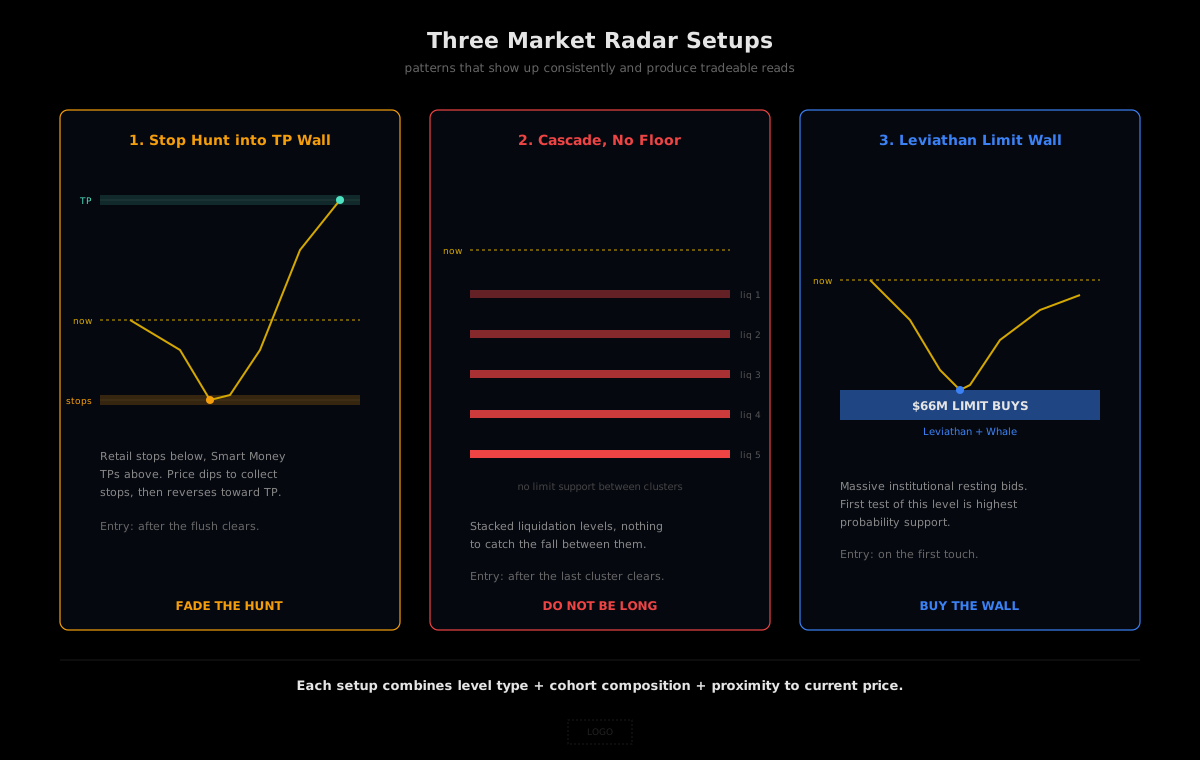
These are the patterns that show up consistently on Market Radar and produce tradeable setups.
Setup 1: Stop hunt into a TP wall. A thick cluster of retail (Fish, Dolphin) stop losses sits just below current price at $99,200. Above current price at $101,500, a thick cluster of Smart Money and Whale take profits. The read: the market is likely to dip into the stop cluster, trigger the retail exits, collect the liquidity, and then reverse toward the TP level. The entry is after the stop hunt clears, not before. Wait for the flush, let the cluster trigger, and enter the reversal when the selling exhausts.
Setup 2: Liquidation cascade with no floor. A stack of liquidation clusters below price, each one 0.5% to 1% apart, with no significant limit order support between them. This is the textbook cascade: once the first cluster triggers, there is nothing to catch the fall until the next cluster, which triggers, and so on. The read: do not be long. If you want to catch the bounce, wait for the last cluster to clear and the book to thicken. Enter after the cascade, never during.
Setup 3: Leviathan limit wall. A massive limit buy cluster from the Leviathan and Whale cohorts at a specific price level, with minimal stop or liquidation exposure at the same level. This is a floor. The largest wallets on the exchange have placed resting bids there, which means they are willing to absorb selling at that price. The read: this level is likely to hold on the first test. It may not hold on the second or third, but the first touch is the highest-probability support level Market Radar can show you.
Market Radar and the API
The data powering Market Radar comes from the same position and order state that the HyperTracker API exposes. If you want to build your own visualizations or alert systems on top of this data:
/positionsreturns open positions with entry prices, leverage, and liquidation levels, filterable by cohort/orders/5m-snapshotsreturns rolling 5-minute windows of resting orders with stop/TP visibility/liquidation-riskreturns asset-level liquidation exposure scoring/cohort/metricsreturns aggregate positioning by behavioral segment
Market Radar is the visual layer. The API is the programmable layer. Traders who want to scan levels by eye use Market Radar. Builders who want to trigger alerts when a specific cluster forms or when price approaches a cohort's peak liquidation level use the API.
Free tier allows 100 requests per day. No credit card required.
Closing thoughts
Price on a perp chart is the result of two things colliding: active orders pushing price in a direction, and resting orders waiting at specific levels to absorb, exit, or get forced out. Most traders only see the active side (candles, volume, momentum). The resting side is where the map is.
Market Radar turns that resting liquidity into a visual. Every liquidation level, every stop loss, every take profit, every limit order, aggregated across hundreds of thousands of wallets and broken down by the cohort that placed them. The levels that matter are not the ones drawn on the chart with a horizontal line and a hope. They are the ones where actual capital is stacked, waiting to move.
The next violent move on Hyperliquid already has an address. It is the price where the thickest cluster of resting liquidity sits. Market Radar shows you the address before the market gets there.